

Evergreen Crawl overview
EdgeComet Evergreen Crawl is a site audit built from the pages search engines and AI bots actually received from your site. It checks indexation, canonicals, hreflang, on-page tags, internal links and structured data on those pages, without a crawler of its own.
Every issue it finds names its pages and the demand on them: the Google impressions and the AI assistant fetches those pages earned. You see which issues carry traffic, not only which ones touch the most pages.
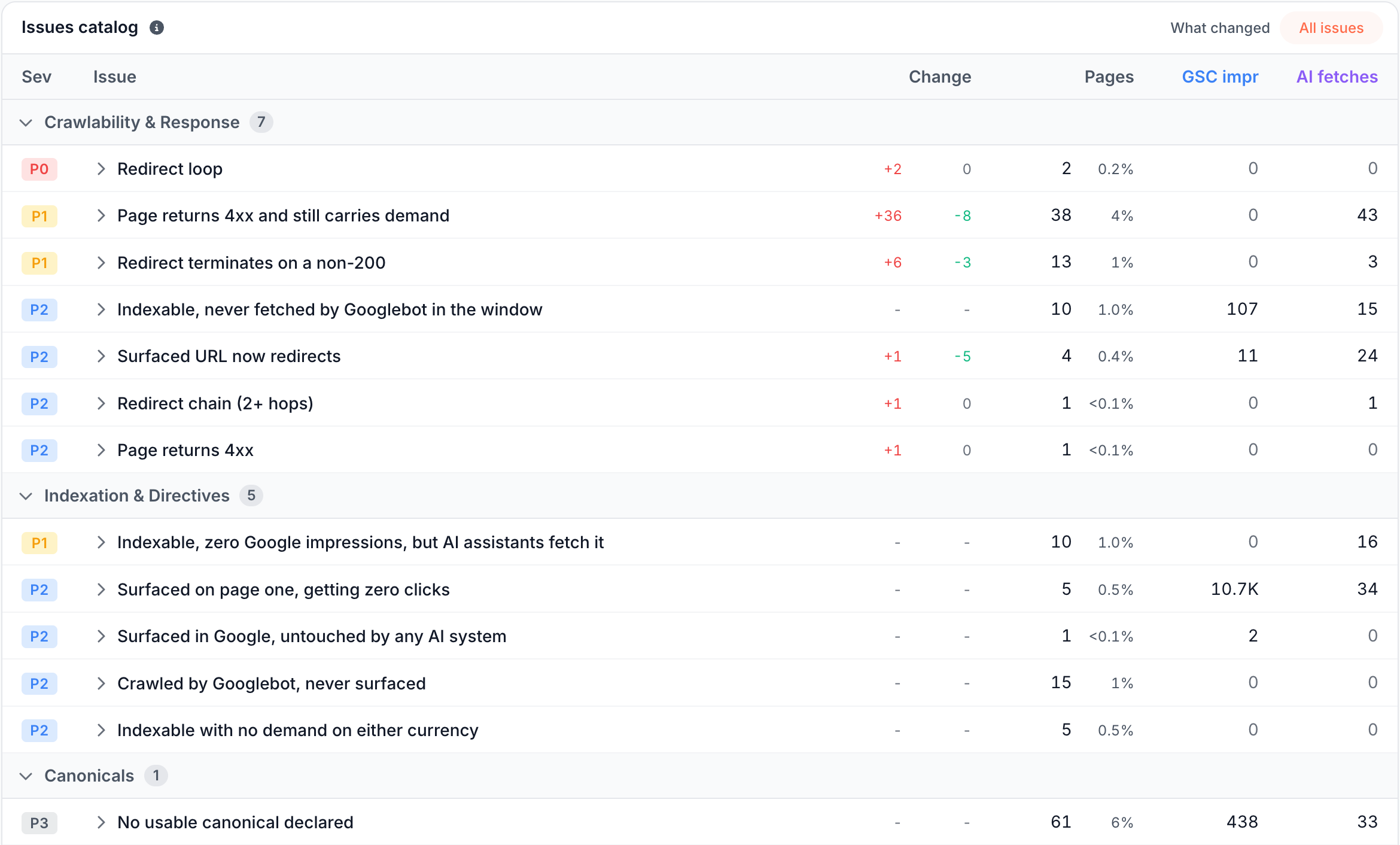
Evergreen Crawl is real-time: EdgeComet records each page the moment it serves it to a bot, and the crawl is built from those records.
- Always available. There is no crawl to schedule, configure or start. Once your first crawl is built, a crawl of your site is ready whenever you open a report.
- Always fresh. The Current crawl rebuilds on its own every day from the pages bots received in the last 30 days.
- A time machine. Monthly crawls keep a snapshot of the site month by month. Compare the latest crawl with the month before, compare one month with another, or reopen a past crawl to see the site as bots received it then.
- Automatic comparison. Every report compares the crawl you read with the previous period or the previous crawl, with no setup. New, worse and improved issues, and the pages that entered or left each one, show on their own.
How Evergreen Crawl works
Evergreen Crawl reuses the pages EdgeComet already serves. Each time EdgeComet renders or fetches a page for a bot or a pre-cache rule, it records the page it served, from the title and robots directives to the structured data and every link.
A crawl is a stored snapshot of your site over a date window, built from those records. For every URL that search engine or AI bots, or your pre-cache rules, fetched in the window, the crawl keeps the newest page EdgeComet recorded, plus the links between pages and the redirects. EdgeComet then runs the issue checks on the crawl, and every report reads the result.
Building the audit this way has three effects:
- You audit what bots received. Each page is the copy EdgeComet served, with your Edge SEO changes applied. When EdgeComet renders your pages, content that only appears after JavaScript runs is in the audit.
- Your site gets no extra requests. Evergreen Crawl fetches nothing on its own: no crawl load on your server, and no crawler to allow through your firewall.
- Every page carries its demand. The crawl shares URLs with Search Console and the bot log. Each page comes with its Google impressions and its fetches by AI assistants answering users. The two are shown side by side and never added up.
A URL that crawled pages link to, but that no bot fetched in the window, enters the crawl as a link-only stub. The crawl knows the URL exists and which pages link to it, but not its content.
Current, monthly and custom crawls
Each site has three kinds of crawl, listed in the Crawls manager. See Current, monthly and custom crawls compared.
- Current: the last 30 days of bot visits and pre-cache fetches, rebuilt every day. Every report opens on it.
- Monthly: built in the first days of each month over the 30 days before, and named for the previous month, such as September 2026.
- Custom: a crawl you start with + New crawl, for the bots and the period you choose, such as Googlebot only over the last 14 days.
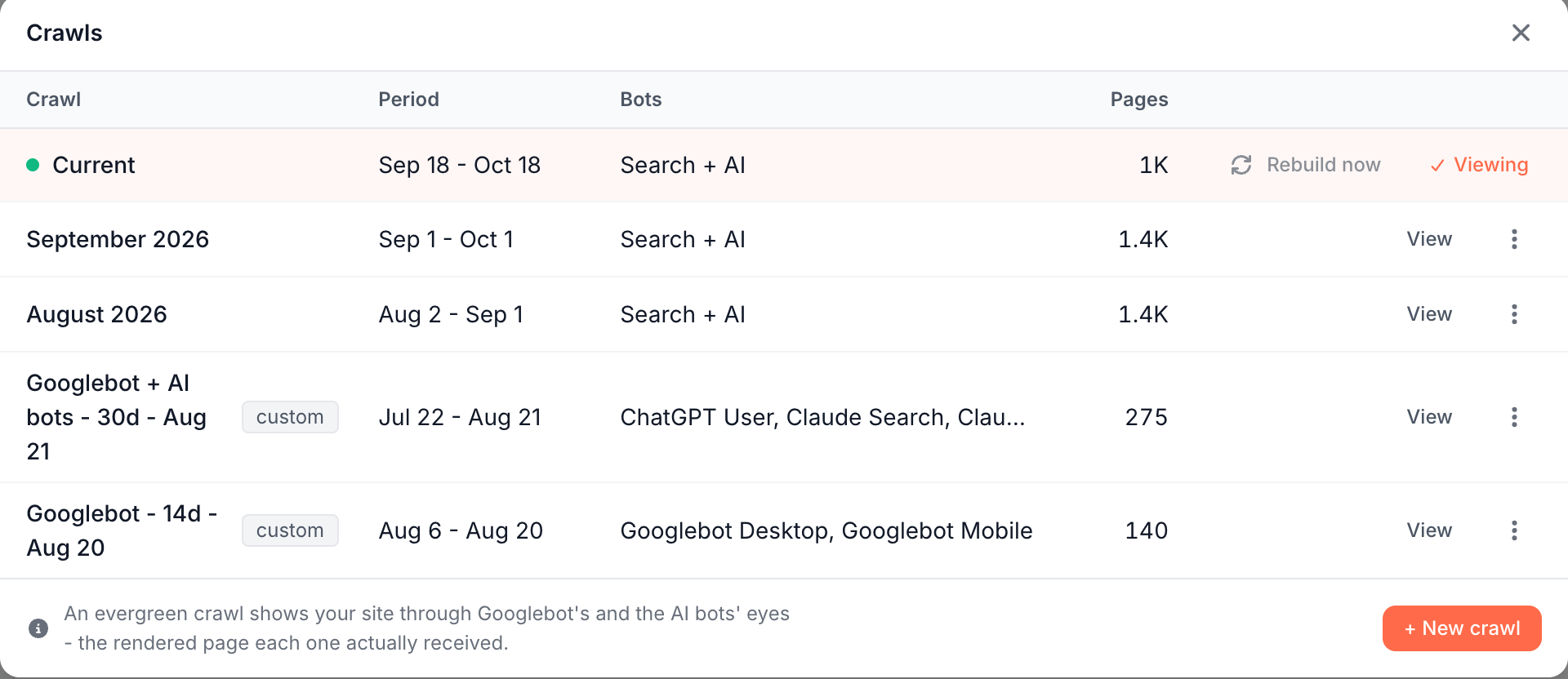
Every report compares the crawl you read with a comparison crawl that EdgeComet picks for you, and the Change column and Changed since last crawl cards show the pages that entered and left. To open, start, rebuild, delete or compare crawls, see Manage crawls.
When the first crawl appears
The first crawl is built once the site has 3 days of verified bot visits, and until then every crawl report reads "Your first crawl is scheduled" with the date. Run a crawl now builds one at once over the bot visits of the last 30 days. See Your first days.
What you can see
Seven reports under Evergreen Crawl read the same crawl, and each answers one question.
Issues: what should you fix first?
Issues lists every check that found pages, with its severity, its pages, the Google impressions and AI fetches on them, and the pages that entered and left since the comparison crawl. More than 150 checks run on every crawl, in 11 categories: Crawlability & Response, Indexation & Directives, Canonicals, Internal Linking, On-Page Tags, Content, Hreflang, URL & Transport Hygiene, Structured Data & Images, Search Performance and Catalog Health.
Each check has a fixed severity, from P0, active loss or config conflict, to P3, hygiene, and demand orders the issues within a severity. A check that cannot run on your data, for example without Search Console, says why instead of reporting zero. See Find and prioritize technical SEO issues.
Indexation: which pages can be indexed, and does anything show them?
Indexation puts each page in one bucket, such as Indexable, Noindex or Redirect 3xx, and splits indexable pages into those Google or AI assistants surface and those with no Google impression or AI assistant fetch in the window. See Find pages Google cannot index.
Canonicals: do canonicals point where they should?
Canonicals sorts every 200 page by the canonical it declares and the health of its target, and lists canonicalized pages Google still shows. See Find canonical issues.
Hreflang: are language versions complete and linked both ways?
Hreflang checks self-references, broken alternates and how completely each language is declared. See Find hreflang errors.
On-Page Tags: are titles, meta descriptions and H1s unique?
On-Page Tags finds duplicated, missing and too-long titles, meta descriptions and H1s, and groups duplicates by the template that stamps them. See Find duplicate, missing and long tags.
Internal Linking: do pages that earn traffic get links from content?
Internal Linking splits links from page content and links from templates, such as menus and footers, and finds orphan pages, broken links and pages that earn traffic with almost no content links. Its Changes tab shows the links added and removed since the comparison crawl. See Find orphan pages and broken internal links.
Structured Data: is the JSON-LD bots receive valid?
Structured Data shows which rich results each type can earn and which pages lack the markup their type needs. Its Validation tab checks the JSON-LD bots received against schema.org and Google's rich result requirements. See Check structured data and rich result eligibility and Validate structured data across your site.
Where else the crawl appears
The same crawls feed the Shelf Edge e-commerce reports, Data Explorer > Evergreen Crawl and the Action Board, which turns issues into fixes. AI clients read them through the EdgeComet MCP server, and crawl alerts compare each new crawl with the one before.
Filter, drill down and ask
Every Evergreen Crawl report has the same controls:
- Filter: a saved segment, such as product pages, or a filter you build. It narrows the report, not the crawl behind it.
- Drill down: issue dialogs and tables list the pages behind each number, and View rows opens them in Data Explorer > Evergreen Crawl. Each page has a Page Analysis link that opens everything EdgeComet knows about the page.
- Ask: EdgeComet's chat about your data, with starter questions for the report, such as "Where would one fix help most?"
How Evergreen Crawl differs from a site crawler
A site crawler sends its own bot through your links and audits the copy it gets. Evergreen Crawl audits the copies Googlebot and AI bots got: your site the way search engines and AI assistants see it.
- What gets audited. A crawler renders pages in its own browser, with its own settings. Evergreen Crawl reads the page each bot received, with your Edge SEO changes, and with JavaScript content on the pages EdgeComet renders.
- Setup and load. A crawler needs settings, limits, a schedule and a firewall allow rule, and adds requests to your server. Evergreen Crawl needs only the routing you already have.
- Priority. Every issue shows the Google impressions and AI assistant fetches at stake, and within each severity, issues are ordered by that traffic rather than by page count.
- Change over time. Every crawl is compared with the previous period or the previous crawl automatically. What broke and what got fixed shows up without comparing crawls by hand.
A crawler's strength is reach: it follows links to pages no bot has requested yet. Evergreen Crawl lists those URLs as link-only stubs, and pre-cache rules bring the pages in your sitemaps into the crawl. See Does EdgeComet find pages bots never visit?
For product comparisons, see EdgeComet compared with a site crawler and with an SEO platform that combines a crawler and log analysis.
What Evergreen Crawl does not do
- It does not run a crawler of its own. A page enters a crawl once a search engine or AI bot, or a pre-cache rule, fetched it in the crawl's window. Other URLs appear only as link-only stubs.
- It does not check targets on other hosts. A canonical or an hreflang alternate that points at another host is flagged as declared but not validated, because the crawl holds only your site's own pages.
Where to find it
In the dashboard: Evergreen Crawl, with Issues, Indexation, Canonicals, Hreflang, On-Page Tags, Internal Linking and Structured Data. The crawl selector in each report header, Current by default, opens the Crawls manager. The name and window of the crawl you read, such as Current Sep 18 - Oct 18, show at the right of the tab row.
Next
Related Articles
- Evergreen Crawl V2
- Evergreen Crawl: A New Way to See Your Site Through Googlebot’s Eyes
- AI crawler checker: how to verify bots can reach your pages
- Log File Analysis for SEO: A Practical Guide for 2027
- AI Search Indexation Monitoring: What You Can and Can’t Measure Today
- Tech SEO Connect 2026 recap: logs, AI bots and Edge SEO