

Shelf Edge overview
EdgeComet Shelf Edge is the e-commerce module of EdgeComet. It shows how search engines and AI assistants treat an online store: which product pages Googlebot fetched, what stock they advertise, how category pages are sized and linked, and whether your Merchant Center feed agrees with your pages. Also called e-commerce SEO reports or a catalog audit.
Shelf Edge recognizes product and category pages by what the page shows, such as the product name, the price and the stock badge, not by URL patterns. EdgeComet's AI writes the fields that read those values. See Set up Shelf Edge.
In the dashboard, Shelf Edge is the E-commerce section, with the reports Overview, Products, Listings and Product Feed.
How Shelf Edge works
Shelf Edge joins three sources for every product and category page:
- Evergreen Crawl: the pages search engine bots, AI bots and your pre-cache rules fetched, with the values your catalog fields read from each page. The Current crawl is rebuilt every day. See Evergreen Crawl overview.
- Bot requests and Search Console: each page's Googlebot fetches and AI user bot fetches from the requests EdgeComet serves, and its Google impressions from Search Console.
- Your Merchant Center feed: fetched every hour by default, validated item by item and compared with the pages. See Product Feed.
Product pages and listing pages
A product page is a page where EdgeComet reads a product name, plus a price, a stock value or a SKU. A listing page is a category or search results page where EdgeComet reads a listing title, plus the number of products shown or the result count.
Custom extraction fields read these values from the rendered page, such as product_name from the product heading and availability from the stock badge. EdgeComet does not use URLs, segments or structured data to decide what a product page is. A page can be both a product page and a listing page. See The fields the reports read.
When the reports fill
A field you add fills the reports from the next crawl on. See The reports fill from the next crawl.
Overview, Products and Listings each show one crawl, chosen in the header, with no period control. Search Console figures use that crawl's own dates, and changes compare it with the comparison crawl. Product Feed has a period instead: Last 24h, 7 Days or 30 Days.
What you can see
Shelf Edge has four reports, under E-commerce in the dashboard. Overview, Products and Listings read the crawl. Product Feed reads your feed.
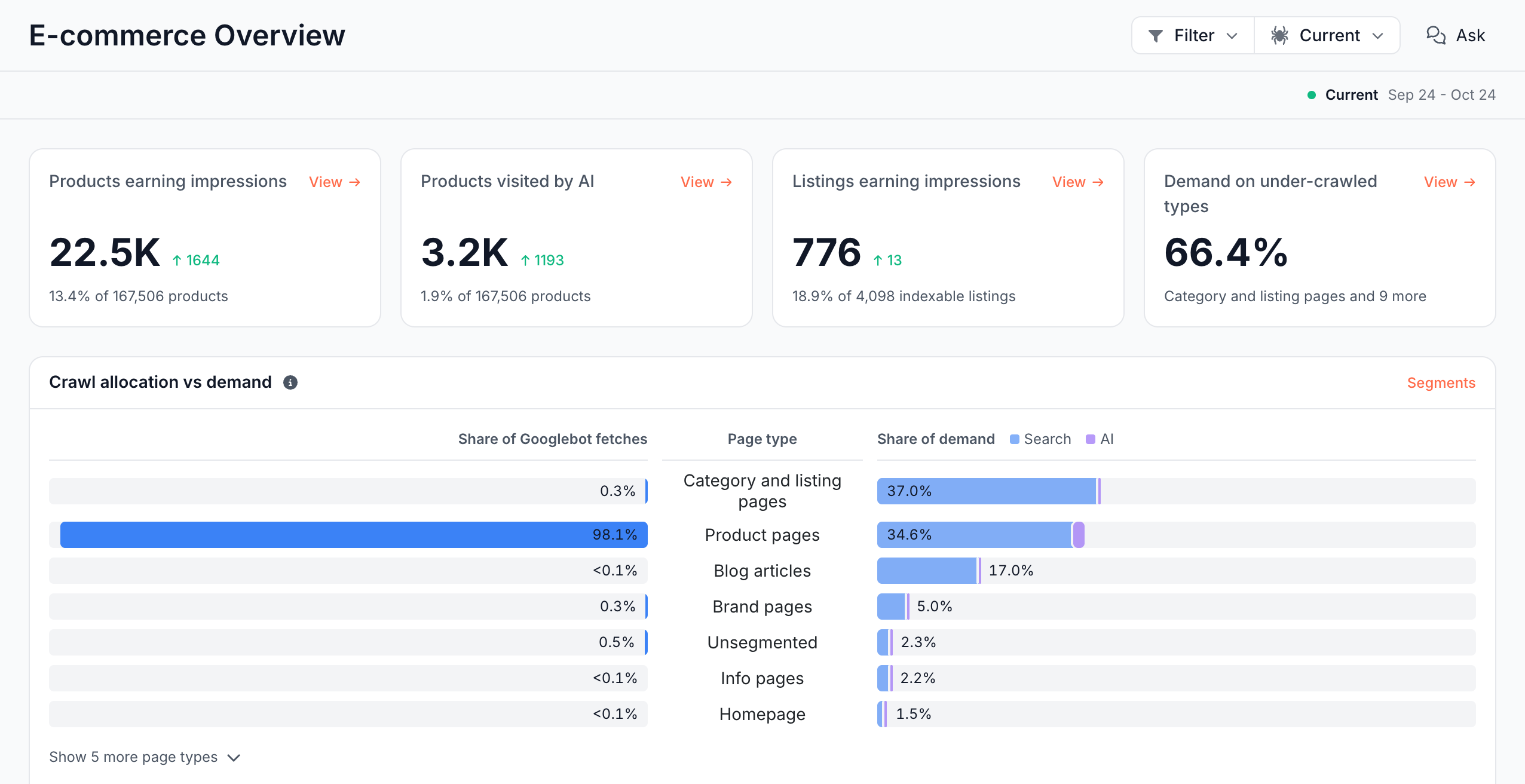
Overview: does Googlebot crawl the page types that earn demand?
Overview counts the products that earn Google impressions and AI fetches, and the listings that earn impressions. It sets each page type's share of Googlebot fetches against its share of Search and AI demand, which shows page types that earn demand but get little of the crawl. See Compare Googlebot's crawl with demand by page type.
Products: which product pages are uncrawled, orphaned or out of stock?
Products counts product URLs Googlebot did not fetch, products no page links to, and withdrawn products that are still indexable. It groups product pages by stock state and shows which products changed state since the comparison crawl. See Find uncrawled, orphan and out-of-stock product pages.
Listings: which category pages are thin, and which facets spawn URLs?
Listings sizes every category and search page on its own URL by the products it displays, finds thin and near-empty listings, and groups faceted URLs by query parameter. See Find thin category pages and faceted navigation URLs.
Product Feed: is your Merchant Center feed healthy, and has Google seen the changes?
Product Feed shows what each feed fetch changed, the feed checks that fail, and whether Googlebot, AdsBot and StoreBot fetched the products whose price or stock changed. See Product Feed: monitor your Merchant Center feed and Merchant Center feed checks and feed errors.
Catalog Health issues: what is wrong on product and listing pages?
Overview, Products and Listings each list the Catalog Health issues found on their pages, ranked by severity and by the demand at stake. Examples include Out-of-stock products, Withdrawn products indexable and still crawled, Near-empty listing pages and Page price differs from the feed.
The same checks form the Catalog Health category of the Evergreen Crawl issue catalog. See Issue categories and examples.
Product and listing tables: how do you work through every page?
Products and Listings each have a second tab, Product pages or Listing pages, with one row per page. Filter, sort and export them like any Data Explorer table. Most numbers on the reports open the rows behind them.
Ask: what can you ask about these reports?
The Ask button on each report answers questions about the same data. On Overview it offers "Does crawl follow product demand?" and "Are product pages being surfaced?". See Ask overview.
How Shelf Edge differs from a crawler-based audit
A crawler-based SEO tool requests your shop on a schedule and tells product pages apart by URL patterns or markup. Shelf Edge reads the store the way bots receive it:
- Your own page fields, written by AI: EdgeComet recognizes products and categories by the name, price, stock badge and product count on the page. This works on any platform, in any language, with no URL patterns to maintain. EdgeComet's AI writes the extraction rules and repairs rules that stop matching after a site release.
- Real bot fetches per product: every product page, category page and stock tier shows the Googlebot and AI assistant fetches EdgeComet served, next to its Google impressions. You upload no logs.
- Feed, page and Google side by side: EdgeComet checks each product page against your feed for price and stock, and checks whether Googlebot, AdsBot or StoreBot fetched each changed feed item again. It re-caches changed products at high priority, which means bots read the new price.
- Stock wording in any language: EdgeComet's AI sorts your shop's own stock wording, such as "hurry, only 3 left", into availability tiers. You maintain no mapping table.
- Daily crawl: EdgeComet rebuilds the crawl every day and compares it with the comparison crawl on its own. You schedule nothing.
A crawler reaches pages no bot has requested yet, on its own schedule. Overview, Products and Listings read a page once a bot or a pre-cache rule has fetched it. Products also counts the product URLs in your feed that no bot has fetched yet. For a product comparison, see EdgeComet compared with an SEO platform that combines a crawler and log analysis.
Where to find it
In the dashboard: E-commerce, with Overview, Products, Listings and Product Feed. The section is labeled E-commerce in the app and Shelf Edge in the docs. Catalog fields are in Configuration > Custom extractions, and the feed URL in Configuration > Caching > Merchant Feed Re-cache.