

Find keyword cannibalization in Search Console data
EdgeComet's Cannibalization report finds the keywords where two or more of your own pages compete in Google, from your Search Console data. Also called keyword cannibalisation or competing pages.
For each conflict it counts the clicks that went to the pages other than the leader, and ranks the keyword by how split the traffic is. You see which conflicts split the most clicks and which ones Google has already settled.
The report has two tabs: Overview, with the cards and charts, and Cannibalized keywords, the list of every conflict. The period, filter, drill-downs and Ask panel work as on every Search report: see Filter, drill down and ask. The Cannibalized keywords tab always lists the whole site.
What counts as keyword cannibalization
A keyword is cannibalized in a period when it is co-ranking, alternating, or both:
- Co-ranking: on at least one day, two or more of your URLs drew impressions for the keyword at position 20 or better, the first two pages of Google results.
- Alternating: the sub-period leader changes during the period. The sub-period leader, for each day or, for periods longer than 14 days, each week, is the URL with the most impressions, counted when it has at least 3 impressions at position 20 or better.
Diluted clicks are a keyword's total clicks minus the clicks of its leading URL, the URL with the most clicks in the period. They show how much traffic the split sends to the other pages. Read them as the most that combining the pages could recover, not as measured loss.
Other EdgeComet surfaces use their own rules under the same name:
- The Cannibalized keywords card in the Keywords report counts keywords with two or more URLs that each drew at least 10 impressions at an average position of 20 or better over the period. See the Keywords stat cards.
- The Cannibalized keywords opportunity bucket in the Keywords report uses "2+ URLs with >= 10% click share each". See the cannibalized bucket.
The three numbers can differ for the same period. This report's rule also catches conflicts where the lead keeps changing hands.
What the report shows
The Overview tab answers how many clicks cannibalization splits, whether it is growing, which conflicts come first and which sections carry them.
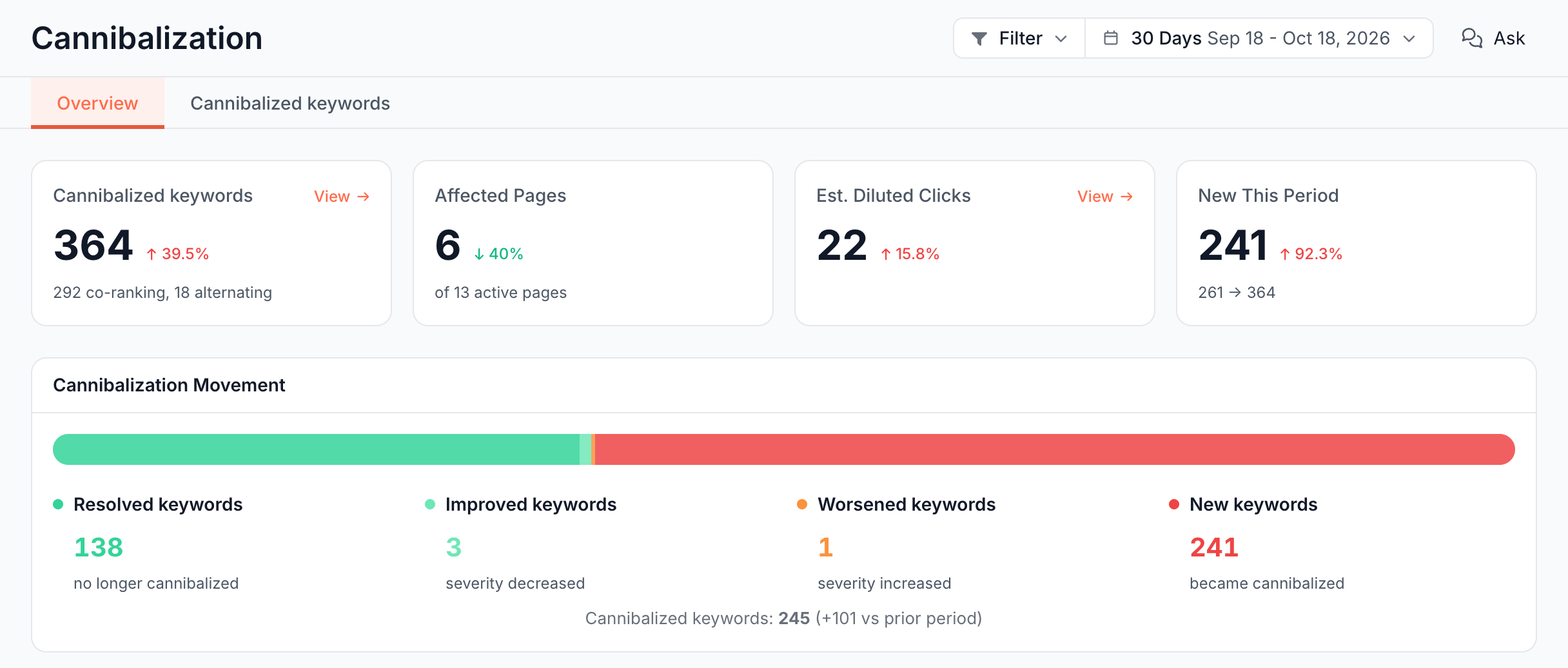
Stat cards: how many keywords, pages and clicks?
- Cannibalized keywords: keywords that meet the rule. The footer splits them, for example "12 co-ranking, 5 alternating", counting the keywords that are only one of the two.
- Affected Pages: your URLs on cannibalized keywords that drew at least 10 impressions at position 20 or better and earned a click. The footer reads "of N active pages", every page with a click in the period.
- Est. Diluted Clicks: the diluted clicks of every cannibalized keyword, added up.
- New This Period: keywords cannibalized now that were not in the previous period. The footer shows the total before and now, such as "40 -> 52".
View on Cannibalized keywords and Est. Diluted Clicks opens the keywords behind the number.
Cannibalization Movement: what changed since the previous period?
Cannibalization Movement compares each keyword with the previous period of the same length:
- Resolved keywords: no longer cannibalized.
- Improved keywords: still cannibalized, with fewer diluted clicks ("severity decreased").
- Worsened keywords: still cannibalized, with more diluted clicks ("severity increased").
- New keywords: became cannibalized.
The line under the bars reads "Cannibalized keywords: N (+x vs prior period)". A keyword whose diluted clicks did not change counts in none of the four, which is why they do not add up to the total.
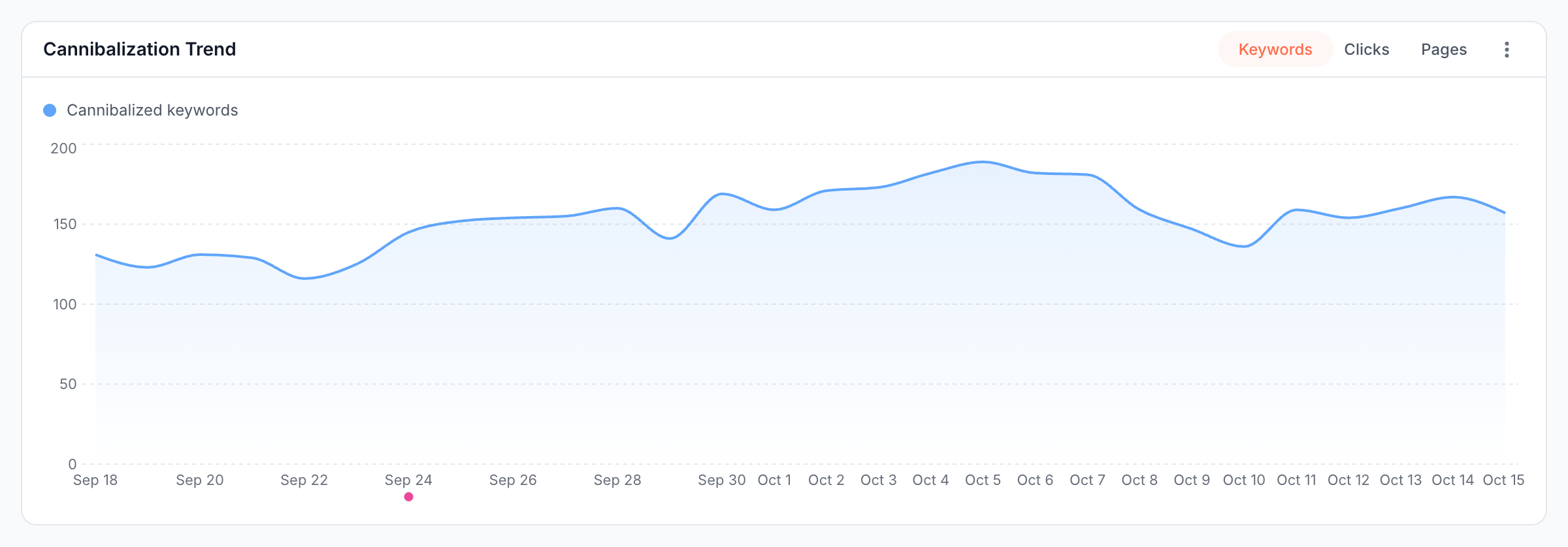
Cannibalization Trend: is it growing?
Cannibalization Trend plots one metric at a time with the Keywords, Clicks and Pages toggle: cannibalized keywords, diluted clicks or affected pages. EdgeComet finds the cannibalized keywords over the whole period first, then shows when each was active. A point shows how many of the period's cannibalized keywords drew impressions that day or week, not how many were cannibalized then.
Action Priority: which conflicts come first?
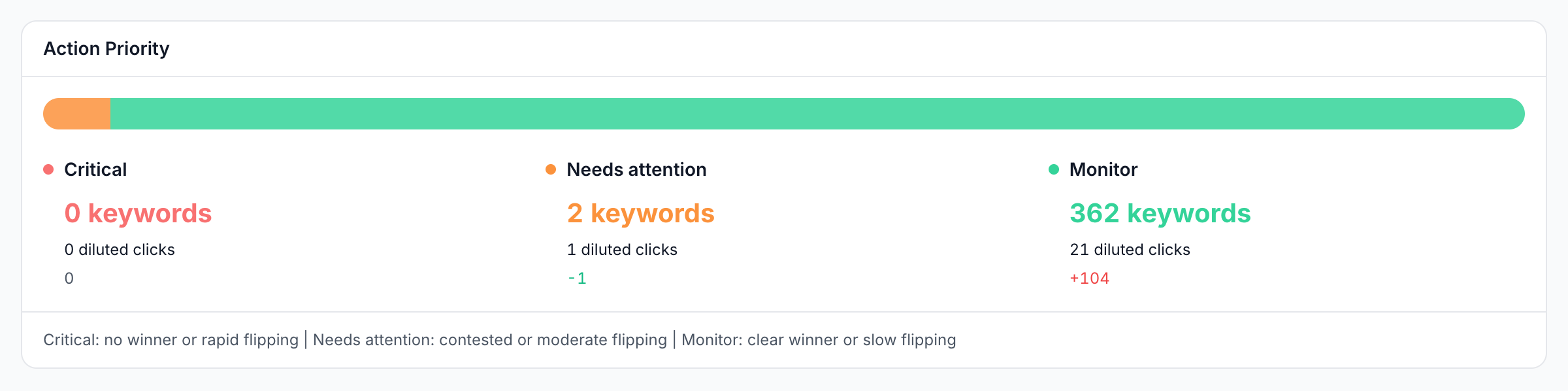
Action Priority files every cannibalized keyword under one of three levels, judged on how much of the keyword's clicks the leading URL holds and how many URLs led a sub-period:
| Level | Description in the dashboard | Rule |
|---|---|---|
| Critical | "no winner or rapid flipping" | The leading URL holds under 40% of the clicks, or three or more URLs led a sub-period |
| Needs attention | "contested or moderate flipping" | Everything between Critical and Monitor |
| Monitor | "clear winner or slow flipping" | The leading URL holds 70% or more of the clicks and no other URL led a sub-period |
A keyword with impressions and no clicks goes under Monitor: there are no clicks to split. Each level shows its keywords, their diluted clicks and the change in count since the previous period. Click a level to list its keywords.
Cannibalization by Segment: which sections compete?
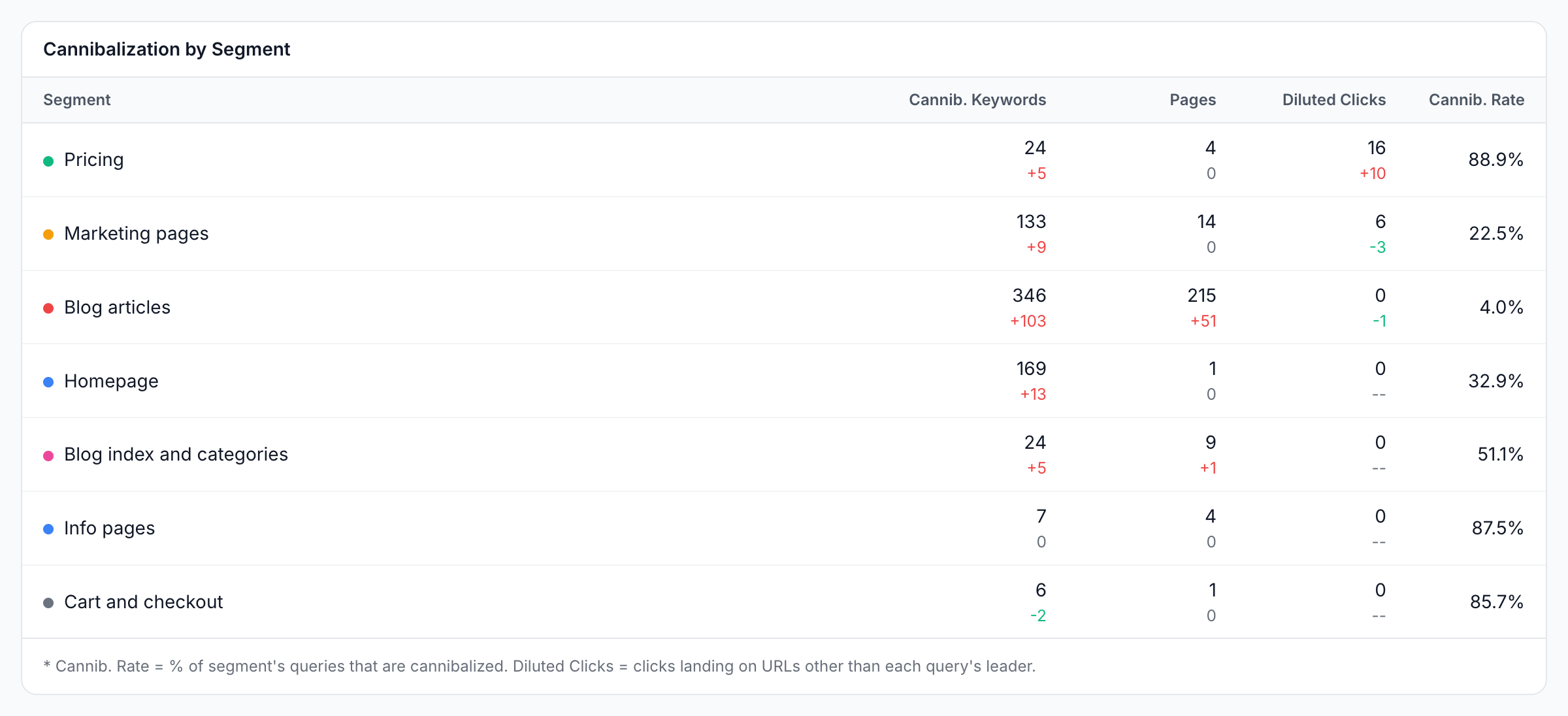
Cannibalization by Segment shows the conflicts in each of your page segments, such as blog posts or category pages. The columns are Segment, Cannib. Keywords, Pages, Diluted Clicks and Cannib. Rate.
The note under the table defines two of them: "Cannib. Rate = % of segment's queries that are cannibalized. Diluted Clicks = clicks landing on URLs other than each query's leader." Pages counts the segment's URLs that rank for a cannibalized keyword, with no impression or click floor, which is why it can run higher than Affected Pages.
A page in two segments counts in both. EdgeComet creates segments from your own data after the first import, and you can edit them under Configuration > Segments.
Cannibalized keywords: which pages compete for each keyword?
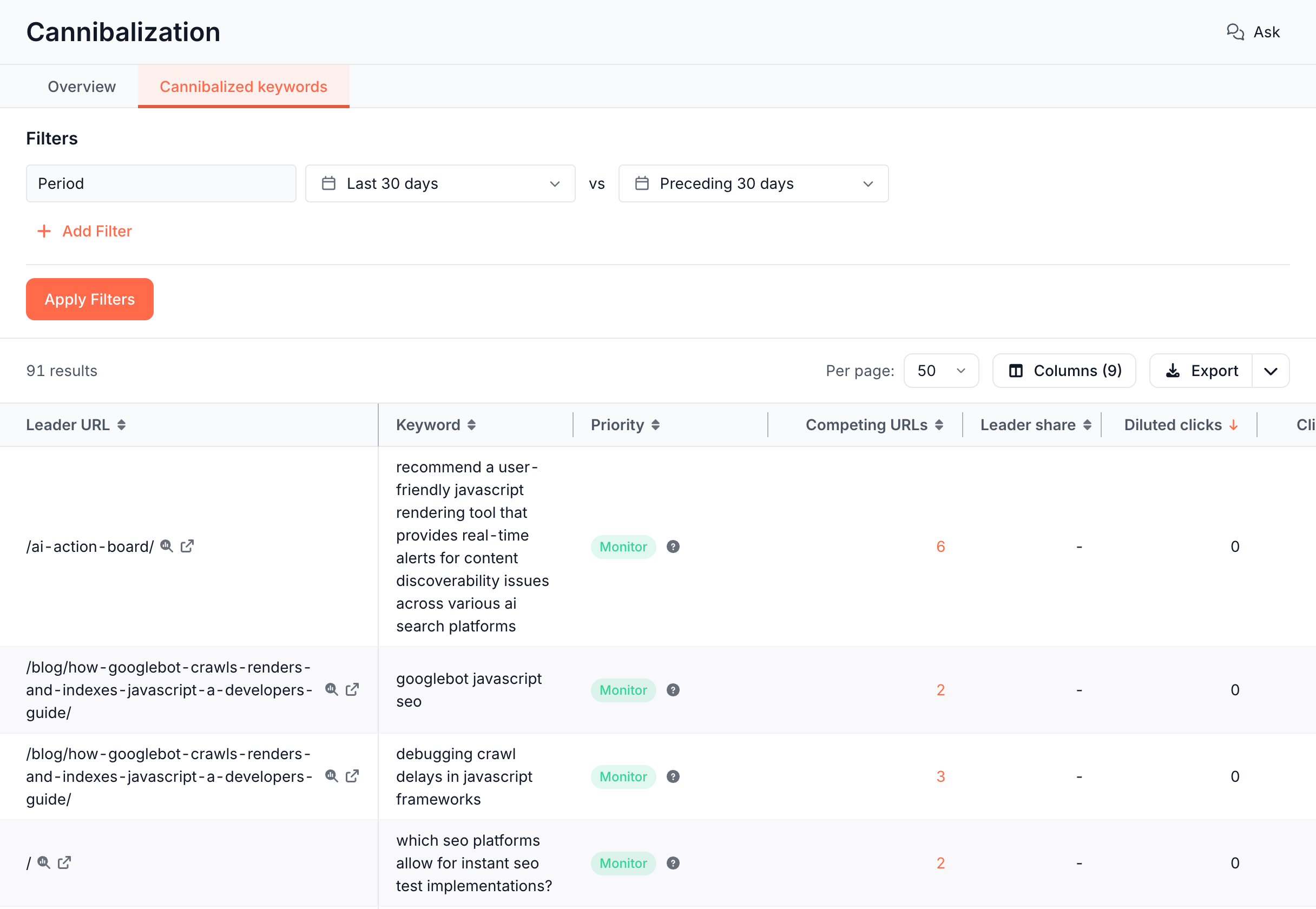
The Cannibalized keywords tab lists every cannibalized keyword, sorted by diluted clicks. The default columns are Leader URL, Keyword, Priority, Competing URLs, Leader share (the leading URL's share of the keyword's clicks, the figure Action Priority judges), Diluted clicks, Clicks, Δ Clicks and Position.
The tab is a Data Explorer table: add columns and filters, and export the rows.
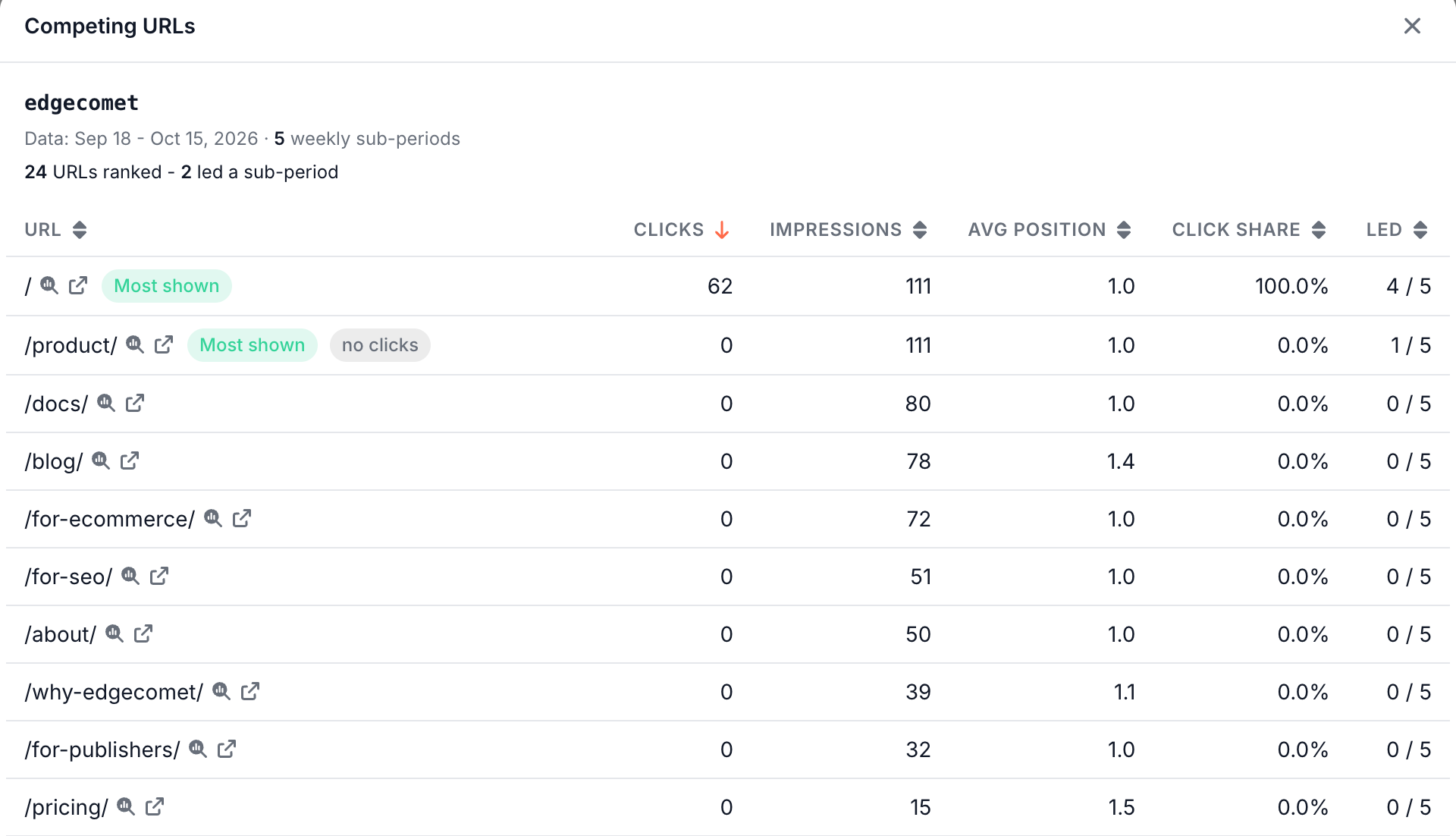
Click the Competing URLs count to open a Competing URLs dialog for the keyword. It shows the date range, the number of daily or weekly sub-periods, and "N URLs ranked - N led a sub-period". Each URL has its Clicks, Impressions, Avg position, Click share and Led, the sub-periods it led.
Two labels mark URLs in the dialog:
- Most shown: a URL that had the most impressions in at least one sub-period. Its tooltip reads "Most impressions in X of Y sub-periods - SERP visibility, not clicks".
- no clicks: a URL that led a sub-period without a click. Its tooltip reads "High SERP visibility but zero clicks - typical for sitelinks under a brand search, not real cannibalization".
When a segment filter is set, the tab title reads Cannibalization (whole site): the tab lists every cannibalized keyword on the site.
How to read it
- Start with diluted clicks, not keyword counts. Hundreds of cannibalized keywords can carry a handful of clicks between them. The tab's sort and the Critical level put the conflicts that split the most clicks first.
- Monitor is often fine. Either one page holds 70% or more of the clicks and kept the lead, which means Google has picked a page, or the keyword has no clicks to split.
- Flipping is the signal to act on. When the lead changes hands often, Google has not settled on one page for the query, and neither page builds a stable position.
- Brand searches look like cannibalization. A brand query often shows several of your pages as sitelinks. The no clicks label in the Competing URLs dialog marks the usual case.
- Counts are a lower bound. Google withholds rare queries, which leaves some conflicts out. See anonymized queries.
How this differs from a simple overlap check
EdgeComet's report keeps the conflicts where your pages showed together or traded the lead, and ranks them by diluted clicks. A common check lists every keyword where more than one of your URLs ranked in a period, which mixes real conflicts with sitelinks, rankings beyond page two and URLs that ranked on different days. The report differs in four ways:
- Visibility, not presence. Co-ranking needs two URLs at position 20 or better on the same day; alternating needs the lead to change hands.
- The clicks each conflict splits. Diluted clicks and Action Priority rank keywords by the clicks the split sends to other pages, not by how many URLs appeared.
- Your real queries. The report reads every keyword in your Search Console data, not a sample of keywords you track.
- Your sections. Cannibalization by Segment shows where conflicts cluster, such as tag pages against articles.
What to do next
- Pick the page that should win: open the Competing URLs dialog and choose the URL that answers the query best, usually the one with the most clicks or the best position.
- Point the others at it: set a canonical to the winning page with an Edge SEO link tag rule, or remove the duplicate and redirect it at the edge.
- Set the pages apart: give each page its own title with an Edge SEO metadata rule. The Article optimization skill checks for your other pages that compete for the article's queries and sets the article apart from them.
- Send links to the winner: check which page your content links to for the topic on Internal links.
- Let the Action Board pick it up: its Search Performance analysis shows which pages compete for a query and how, as findings you can fix.
- Ask about it: Ask in the header starts with "How much click dilution is there?", "Which conflicts need action first?" and "Is cannibalization growing?".
Where to find it
In the dashboard: Search > Cannibalization, with the tabs Overview and Cannibalized keywords.