

Custom extractions: extract prices, stock and other fields from pages
EdgeComet custom extractions read named fields, such as price, stock, SKU, author or review count, from the pages EdgeComet processes for bots. Each field comes from an extraction rule: a CSS selector, a regular expression, or both. Also called custom fields.
The values become columns and filters in Data Explorer, fields that Ask and the Action Board can read, inputs to crawl checks and Shelf Edge, and tracked fields in Changes and alerts.
EdgeComet writes the first rules for your site on its own in your first days, and checks every rule each day after that. See What EdgeComet configures on its own.
What an extraction rule is
A custom extraction rule reads one field from each rendered page:
- Name: the field name, such as
price, saved in lowercase with underscores. - Selector and Pattern: a CSS selector such as
.pdp .price, a regular expression such as(\d+) results, or both. - Action and Data type: what to keep when several elements match, such as the first value or a count, and whether it is text, a number, a boolean or a date.
Every rule runs on every page. The selector decides where a value is found, and a page without the element has no value for that rule.
The Group, such as "Product pages", only sorts the list. See Rule options.
How values are collected
EdgeComet reads the values while it processes a page for bots, from the page as bots get it, after your Edge SEO changes:
- When it renders a page for a bot.
- When it refreshes a cached copy, such as for a pre-cache rule. See Pre-cache pages before bots request them.
- When it passes a bypassed page through from your origin.
Only HTML pages that answer 200 give values. A redirect, an error page, or a page Edge SEO answers with a redirect or a 404 gives none. Field rules only read the page and change nothing bots or visitors receive.
A request served from the cache carries no value of its own. For each page, EdgeComet shows the value from its latest render, pre-cache refresh or bypass.
A new rule reads the pages processed after it goes live. Older pages get a value the next time EdgeComet renders, refreshes or passes them through. An edited rule keeps its earlier values.
Where the values appear
Each rule feeds the parts of EdgeComet that read page fields:
- Data Explorer: every rule that returns one value or a list of text adds a column and a filter in the Custom extraction group of the Bot log. Rules that return one value also appear in Data Explorer > Evergreen Crawl. See Custom extraction columns.
- Ask, the Action Board and MCP: rules that return one value appear as fields, with their coverage and sample values. You can then ask, for example, "Impressions and AI user bot visits by blog author". See Segments, page groups and extracted fields and
get_schema. - Crawl checks: checks such as Products missing a price, Thin product descriptions, Stale articles and Articles missing an author read fields with fixed names. Without them, a check lists under Needs an extraction rule or setting. See Checks that could not run.
- Shelf Edge: product and category pages are recognized by catalog fields such as
product_nameandlisting_title. - Structured data: fields such as
price,availability,rating_valueanddate_publishedhold what the page shows. The Structured Data report recognizes product pages and articles by them, and crawl checks such as Page price differs from its Product markup and Visible publish date differs from Article markup compare your markup with them. Edge SEO structured data writes them into the JSON-LD it adds. - Changes and alerts: with Track changes on, value changes show in the Changes report and alerts can watch them. Ask can create a field with an alert. See How Ask drafts an alert.
A rule that returns a list of values, such as all variant names, shows in the Data Explorer Bot log when its values are text. It does not reach Ask, the Action Board, MCP, Changes or alerts.
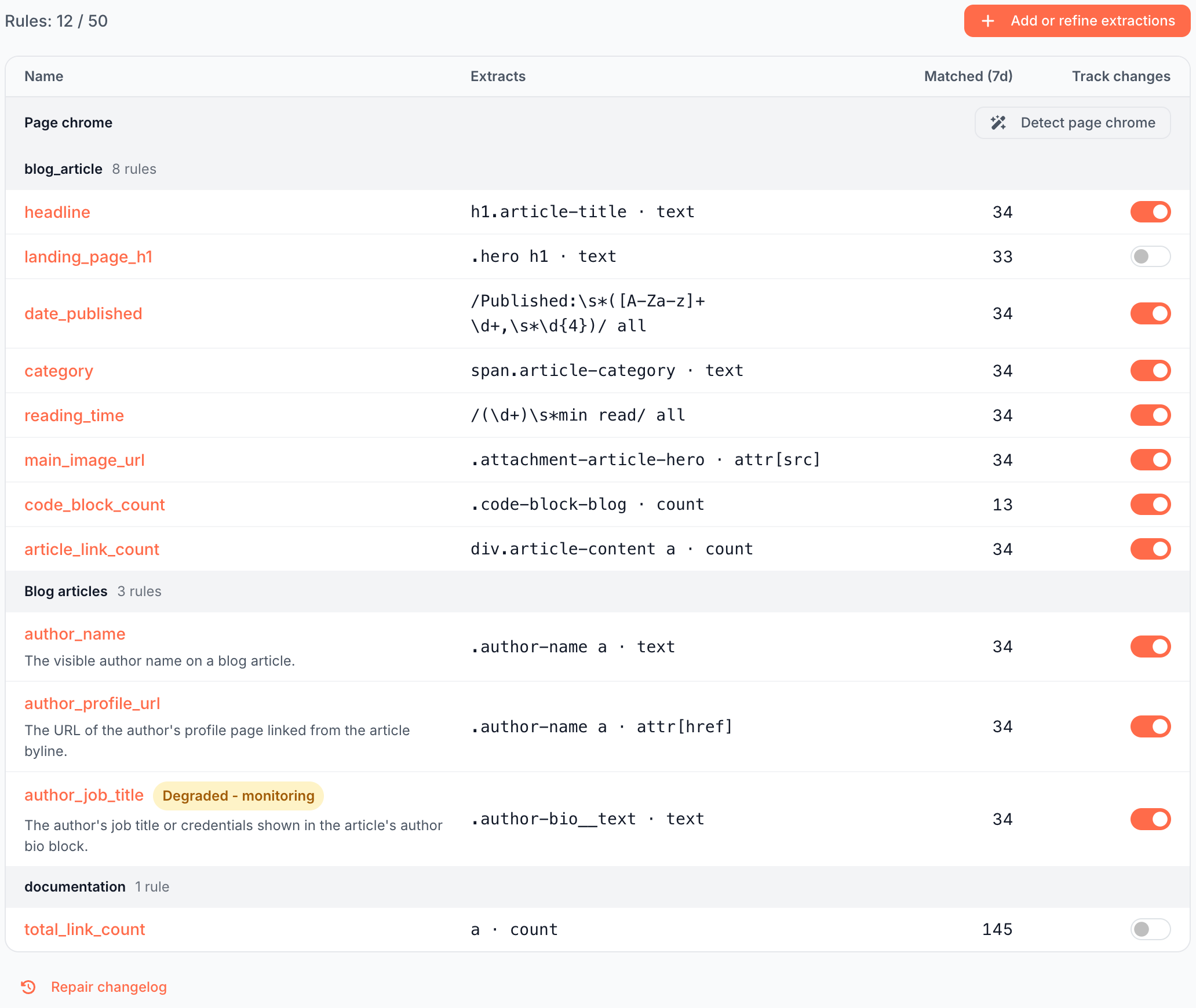
The list of rules
The page lists your rules, grouped by Group, with rules without a group last under Ungrouped. The Page chrome group comes first. See Page chrome.
- Rules: N / 50: your active rules, field and page chrome rules together. See The 50-rule limit.
- N need attention: a red count of rules with a Needs attention label. See Health labels.
- Add or refine extractions: starts an AI run. See Add or refine rules with AI.
On a site with no rules, the page reads "No custom extractions yet", with Generate custom extractions and the link or write a rule manually.
| Column | What it shows |
|---|---|
| Name | The rule name, its health label if it has one, its description, and the alerts that watch it, such as "Watched by the alert" with the alert's name |
| Extracts | The rule in short form, such as .pdp .price · text, a · count or /(\d+) results/ first |
| Matched (7d) | Distinct pages the rule produced a value on in the last 7 days, or since the rule was created, if that is later |
| Track changes | Whether the rule's changes show in the Changes report and alerts. See Track changes |
Under the table, Repair changelog lists the automatic repairs. See The Repair changelog.
Quick view of one rule
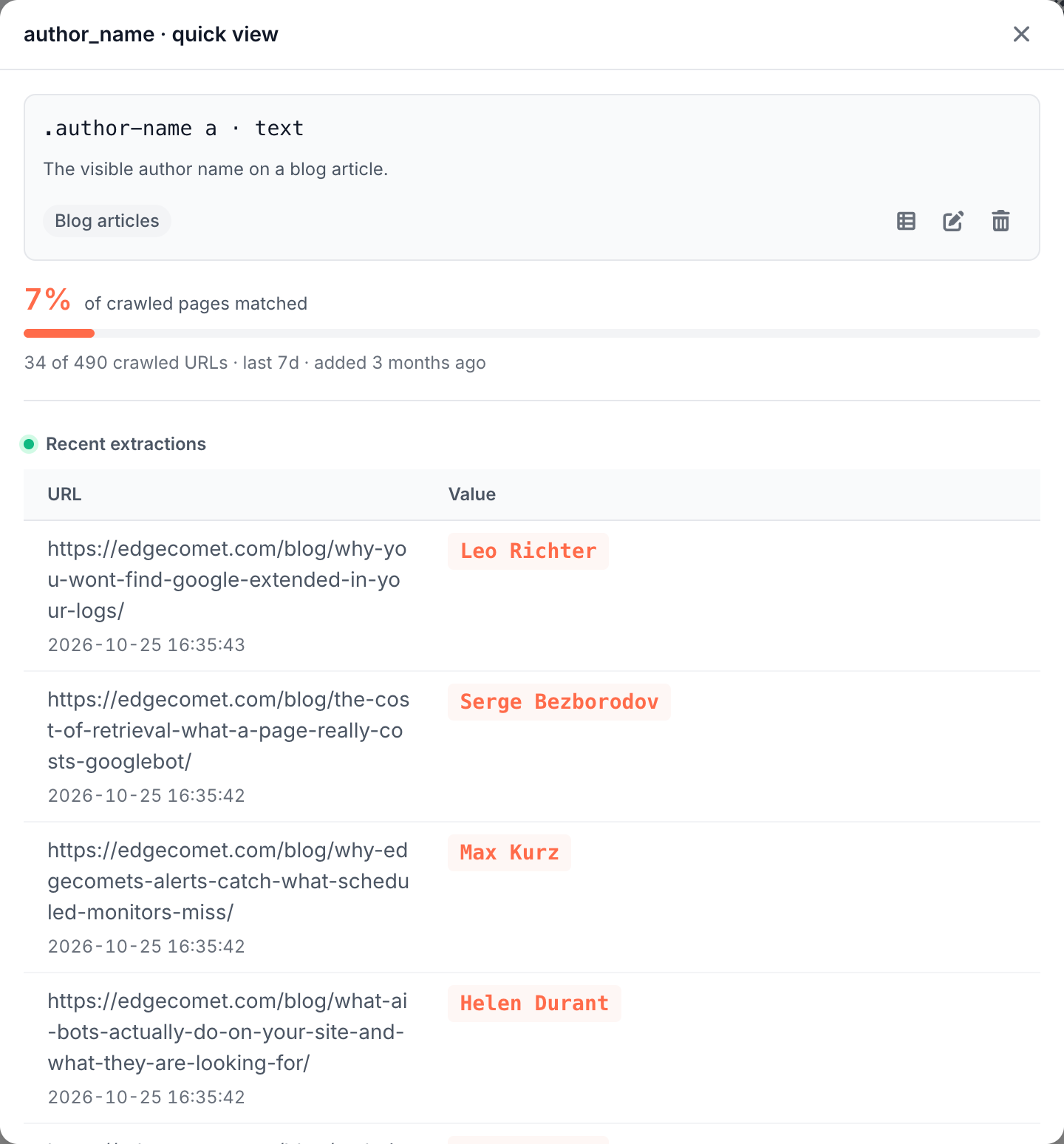
Click a rule name to open "{name} · quick view":
- View rows, which opens Data Explorer with the pages that had a value in the last 7 days, plus Edit rule and Delete rule.
- The coverage, "{N}% of crawled pages matched", over the last 7 days. A rule for one page type covers only that type: a rule for the article author matches only the share of crawled pages that are articles.
- Recent extractions: the latest URL and value pairs from the last 30 days, newest first. A new rule reads "No recent extractions yet."
- Test a URL, to try the rule on any page of your site.
Follow value changes in Changes and alerts
The Track changes switch puts a rule's value changes in the Changes report and the Pages changed alert. It is on for every new rule. Its tooltip reads: "Show this rule in the Changes report and offer it to change alerts. Values keep being collected either way, so switching a rule back on shows its full history at once."
Rules that return a list are not tracked: their switch is off and its tooltip reads "Lists are not tracked". An alert that watches a rule with tracking off is refused with "Turn on Track changes for that rule, or watch something else."
Keep menus and cookie bars out of page text
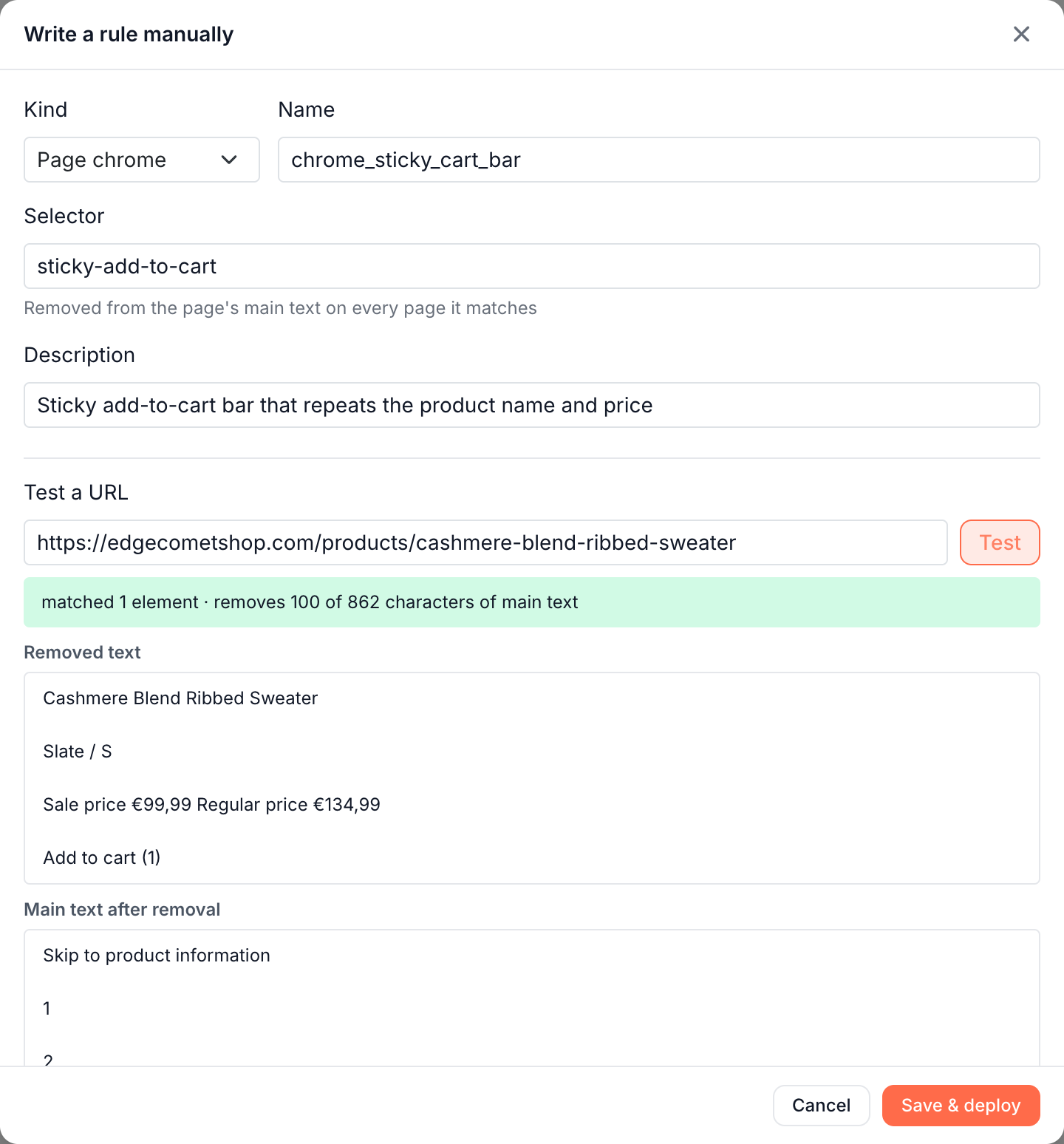
Page chrome is the repeated parts of a page that are not its content, such as a cookie consent bar, a promo strip or a mobile menu. A page chrome rule names one such region with a CSS selector, and EdgeComet removes it from the page's main text on every page it matches. It never produces a value.
The main text is the plain-text version of a page. Once a page chrome rule is live, it applies wherever the page's main text is read, and Test a URL shows the main text with the region removed.
Page chrome rules do not change the pages bots or visitors receive.
To find page chrome, click Detect page chrome in the Page chrome group, or Re-detect page chrome once the site has page chrome rules. An AI run looks for menus, bars and boxes on sample pages and applies the rules it keeps at once, with no review step. Its run page lists Rules applied, Refused page chrome, and Field rules matching inside page chrome, a report that changes nothing.
Generate custom extractions runs and EdgeComet's automatic run look for page chrome too. On a site with no rules, you can also write one yourself: see Write a rule by hand.
How EdgeComet sets up custom extractions for you
EdgeComet writes your site's first rules on its own once it has rendered, pre-cached or passed through your pages for bots over a few days, usually by day 2 or 3.
The run samples your page types, writes rules for the fields each template carries, and tests every rule on real renders of your pages. It puts the rules live with no review step and looks for page chrome as well.
It runs once per site. If the site already has rules, or someone already started a run, EdgeComet leaves the rules to you, and rules you delete stay deleted. On a smaller site, use Generate custom extractions.
If it does not work
Matched (7d) is 0 or lower than expected
Run Test a URL from the rule's quick view on a page that shows the field. If it finds nothing, the selector no longer matches your markup: edit the rule, or check its health label.
If it finds the value, the pages have not been rendered or refreshed since the rule went live. See How values are collected.
A field is missing from Ask, the Action Board or alerts
Those features read rules that return one value. A rule with the action All matches (list) does not reach them. Change the action to First match or a count, or ask for a single-value field in Add or refine extractions. For alerts, also check that Track changes is on.
Where to find it
In the dashboard: Configuration > Custom extractions. Each rule's values are in Data Explorer > Bot log, under the Custom extraction group of columns.