

How the Action Board analyzes your site
An Action Board analysis is the run in which the AI SEO agent reads your site's crawl, Search Console and bot data and writes the board. It runs on its own about every 14 days. Also called the board analysis.
The AI decides which problems make the board, how to group them and which fix to recommend. The engine counts every page, impression and visit and sets every priority from your own data.
Between analyses, EdgeComet recounts every finding without the AI. For the schedule in brief, see How often the Action Board runs.
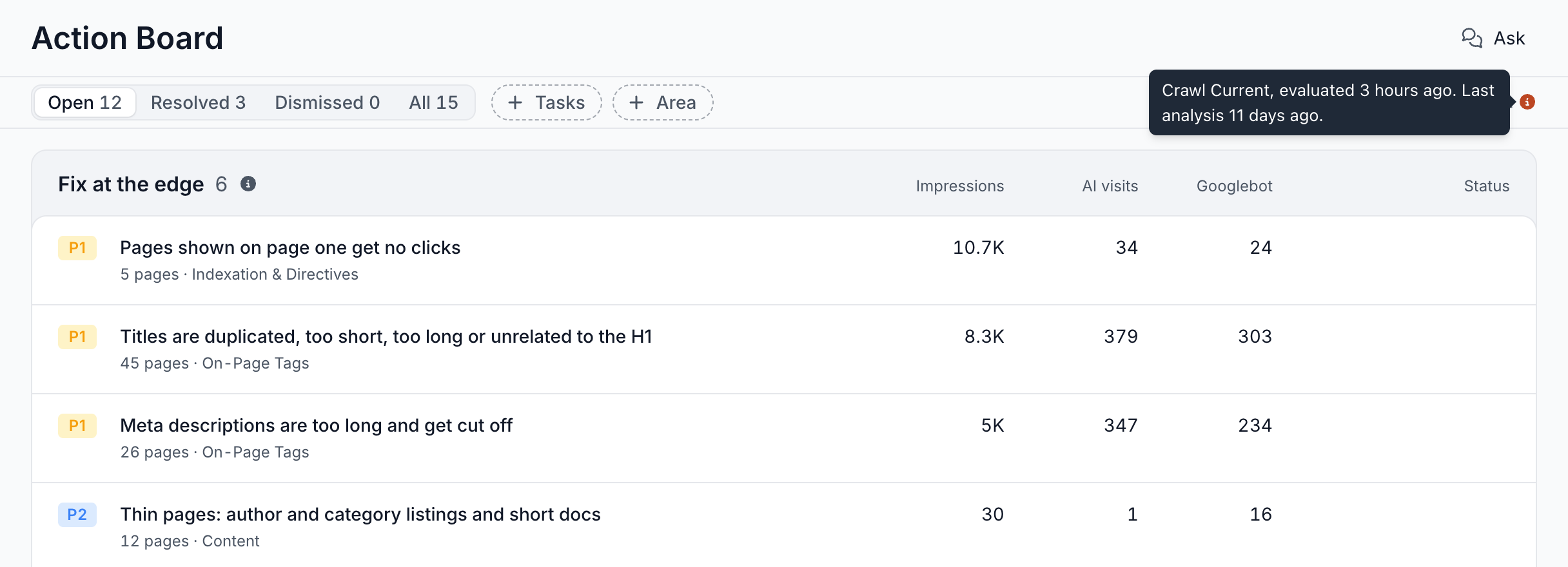
The steps of an analysis
Each analysis builds the board in seven steps:
- It pins one crawl. The analysis takes the newest Evergreen Crawl whose issue checks have finished and works only from it. A crawl that finishes mid-run cannot leave half the board on one crawl and half on the next.
- It builds the issue inventory. More than 150 issue checks have already counted their pages on that crawl, with no AI involved. The inventory lists every check with pages, its page count and the search demand on those pages.
- It checks which data the site has: the bot log, Search Console, the crawl and your XML sitemaps. Your segments tell the agent how the site is organized, while the analysis still covers the whole site.
- Three analysis skills look past the checks. Each one looks for problems no fixed check covers. See The three analysis skills.
- The agent composes the board. It judges the inventory, what the skills found and the findings already open, then returns new and changed findings, findings to keep and findings to close. See How findings are composed.
- The engine computes every number. Page counts, impressions, clicks, AI visits, Googlebot visits and priority come from the crawl and your data. See What the AI decides and what the engine computes.
- It refreshes the rest. Findings the analysis did not change are recounted on the same crawl, and their charts are redrawn with the new counts.
The bot log, Search Console and the crawl share the same URLs. One finding can join them, such as noindex pages that still earn clicks, or pages AI assistants fetch that Googlebot never visits.
The three analysis skills
The analysis skills are the built-in agents that run in every analysis. Each one has a narrow job, reads your data through queries, and records candidate findings. A candidate reaches the board when the agent composes it into a finding, or publishes it on its own as a Discovered finding.
All three follow your site's Guidelines. You find them under Action Board > Skills > Built-in skills.
EdgeComet skips a skill whose data is missing for that analysis. Without Search Console, for example, the board has no Search Performance findings, and most findings have no impressions to rank by. See Connect Search Console.
Indexability
Indexability checks whether the right pages are indexable and where crawl budget goes. It needs the bot log.
It looks mainly for crawl waste the issue checks cannot see: API endpoints, AJAX and widget URLs and tracking-parameter variants that search engines fetch. It counts only URLs that search engines request, not URLs that only scrapers or SEO tools fetch.
Before it blames a template for a pattern, it reads one affected page and confirms what the markup says. When no page links to a URL family, the cause lies elsewhere and the fix differs. See Crawl budget.
Content Quality
Content Quality looks for on-page problems the fixed checks miss. It needs the bot log, which carries each page's extracted title, headings and content.
It looks for patterns such as thin content on indexable pages, title and meta description templates gone wrong, and pages that hold nothing but boilerplate.
Before it calls a page thin, it reads the page. A page whose body arrives through JavaScript looks thin in the data but needs a rendering fix, not more copy. See JavaScript SEO.
Search Performance
Search Performance looks for search opportunities in your Search Console data. It needs Search Console.
It looks for pages that lost clicks or position, queries where a strong page sits just off page one, and topics your site does not cover yet, judged from clusters of related queries. For a decaying page it separates the causes: a lower rank, lost impressions or a falling click-through rate. For cannibalization it shows which of your pages compete for a query and how.
It can check the live search results and keyword data for a query to confirm intent, and it reads a page to see whether the page answers the query it ranks for. Keyword data only decides which finding to record. The finding's numbers come from your own Search Console data.
How findings are composed
The agent turns checks and candidates into findings with a few fixed rules:
- One finding is one job. Duplicate titles, page-one titles that lose clicks and missing meta descriptions become three findings. Two checks share a finding only when they cover mostly the same pages or take the same fix.
- A fix the edge can serve comes first. When an edge change fixes the pages, the agent picks it, such as a robots directive, a self-referencing canonical, a redirect, or a new title, meta description or H1. The XML sitemap, internal links, page templates and body copy go to your developers or writers.
- A template problem gets a template fix. When a value comes from a template, such as every title built from the H1 plus the brand, the step fixes the template or the field it is built from, not each page.
- Every check gets a decision. Each check with pages ends up on a finding, as evidence on another finding, or with one of two decisions. Not a problem means correct as is, covered by another finding or not actionable, and the agent leaves it alone while the check stays the same. Deferred means the agent judges it again at the next analysis.
- Work in progress stays put. The agent leaves a finding with an open task as it is.
A finding holds one or more steps, each with its own pages and fix. See Fix an SEO finding: edge fix, dev task or content brief.
What the AI decides and what the engine computes
The AI decides what goes on the board and how to fix it, and the engine computes every number from your data:
- The AI decides: which problems make the board, how to group them into findings, each finding's title and explanation, and the fix for each step.
- The engine computes: every page count, impression, click, AI visit, Googlebot visit and Opportunity figure, the pages of each step, and the priority.
The agent records each finding as a query over your data, not as a number. The engine runs that query again on every recount, which keeps the finding current without the AI.
Titles and explanations carry no counts, and the board shows the live numbers beside them.
The engine sets a finding's priority from two inputs: the risk level of the check behind it, and the search impressions and AI visits on the pages the finding fixes. When an analysis skill or Ask discovered the finding, the priority starts from the kind of harm the agent names, such as exposed data, broken indexation or wasted crawl budget. See Priority from P0 to P3.
The only figures the engine does not recount are research tables attached to a finding, such as keyword or search results data. See External research.
SEO rules every recommendation follows
EdgeComet gives the agent a short list of rules that apply to every analysis, chat, skill and draft. Each one stops a recommendation that is common in SEO tools but brings no search benefit:
- Google-Extended is not a crawler. It is a robots.txt token that controls Gemini and Vertex AI use of your content. Nothing fetches with that user agent, and blocking it changes nothing for Googlebot, indexing or ranking. See Which robots.txt tokens control each AI bot.
- No FAQPage or HowTo markup work. Google no longer shows HowTo rich results, and shows FAQ rich results only for a few government and health sites.
- No rel=next or rel=prev work. Google stopped using them as an indexing signal in 2019.
- No length-only issues. A title, meta description or H1 is never raised because of its length, because Google truncates and rewrites snippets on its own. A title that names nothing, keyword stuffing, duplicates, a missing tag or a placeholder are still issues.
- Never Disallow and noindex together. A crawler blocked by robots.txt never fetches the page, never sees the noindex, and the URL can stay indexed from links.
- No 404 to 410 changes. Google treats both as gone, which makes the switch developer work with no search effect.
When the agent drops a check because of a rule, the decision cites the rule.
Between analyses: the recount
Each time the crawl is re-evaluated, EdgeComet recounts every finding on the new crawl with no AI involved:
- Page counts, step counts, impressions, visits and priority update.
- A step with no pages left shows Done. A finding whose steps are all done resolves, and its row reads Fixed.
- A resolved finding whose pages come back reopens.
- A finding whose pages cannot be counted on the new crawl shows Paused with the reason in its info icon. Its Download list stays disabled ("This card is paused until its pages can be counted again"), and it resumes when its pages can be counted.
- A finding whose count changes sharply is judged again at the next analysis.
New findings appear at the next analysis. EdgeComet recounts findings you recorded from Ask or a skill run the same way.
Why a finding closed without a fix
A finding can close while its pages still need work. Its row shows the reason instead of Fixed, and the finding page shows the label and the note:
- Not prioritized: "This issue is still present but was not among the priorities of the latest analysis."
- Closed by analysis: the agent closed a finding it wrote earlier, with its reason in the note. When every page is already in the state the fix aims for, the note reads "Every page this card would fix is already in the state its fixes aim for, or is a parameter variant of another URL."
- Check withdrawn: "This check no longer runs on this site, because the setting or extraction rule it reads is gone, so the finding is closed - the pages were not necessarily fixed." When the check's definition changed, the note reads "The check behind this card changed. The next run judges it again."
The board lists closed findings under Resolved.
Before the first board
The first analysis runs once the site has enough data, usually 3 to 4 days after the first verified bot visit. Until then, the Action Board page reads "An SEO agent that finds the work and prepares the fix" and shows where your site stands. See Your first days with EdgeComet.
The first board waits for a crawl that covers 3 days of bot data and has links extracted on at least half its pages. The wait keeps a young, thin crawl from setting the board's priorities. After 7 days at most, the first board opens with the crawl available then.
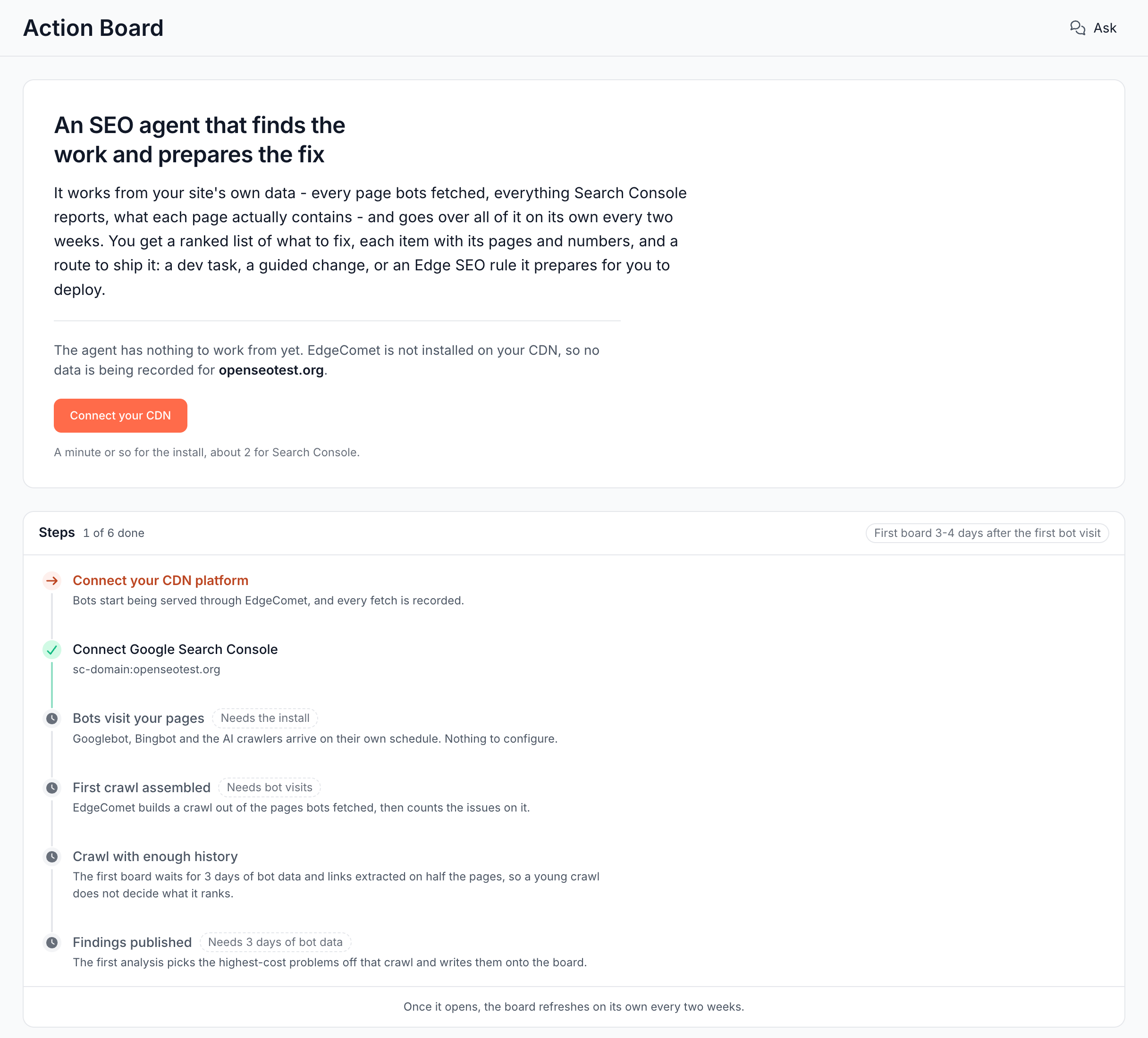
What the page says while you wait
The status line and the estimate follow where your site stands:
| The page says | Estimate |
|---|---|
| EdgeComet is not installed on your CDN, so no data is being recorded | First board 3-4 days after the first bot visit |
| EdgeComet is serving your site and recording every bot fetch. The first crawl is assembled as soon as a verified bot visits | First board 3-4 days after the first bot visit |
| The first crawl is being assembled from the pages bots have fetched | First board 3-4 days after the first bot visit |
| The crawl has finished, and EdgeComet is counting its issues | Counting takes a few minutes |
| Issue evaluation could not be completed. EdgeComet retries on its own | Retried automatically |
| The first crawl is in, but it is still too thin to judge the site by | First board by a date, at the latest |
| Everything the agent needs is in place. The first analysis starts on the next scheduled pass | Within a day |
| The agent is going over your site now | Usually a few minutes |
When issue evaluation fails, the page adds "Nothing to fix on your side. The next crawl also clears it." While the crawl matures, it adds "Bots keep adding to the crawl on their own, and the agent checks it again every day."
The six steps to the first board
Below the status line, six steps show what is done and what each one waits on:
- Install EdgeComet on your CDN. EdgeComet starts serving bots and records every fetch.
- Connect Google Search Console. The board opens without it, but most findings rank by the clicks, impressions and positions Search Console reports.
- Bots visit your pages. Googlebot, Bingbot and AI crawlers arrive on their own schedule.
- First crawl assembled. EdgeComet builds a crawl out of the pages bots fetched, then counts the issues on it.
- Crawl with enough history. The crawl covers 3 days of bot data and has links extracted on half its pages.
- Findings published. The first analysis writes the problems with the most at stake on that crawl onto the board.
The only buttons on the page are the steps that need a person: the install and Search Console.
When the first analysis publishes findings, EdgeComet sends the email "First Action Board findings for" your domain. It lists the top findings and links to the board with Open the Action Board.
Where to find it
In the dashboard: Action Board > Board. The header names the crawl the numbers come from, such as Crawl Current, and its info icon shows when the last analysis ran.