

How EdgeComet keeps cached pages fresh
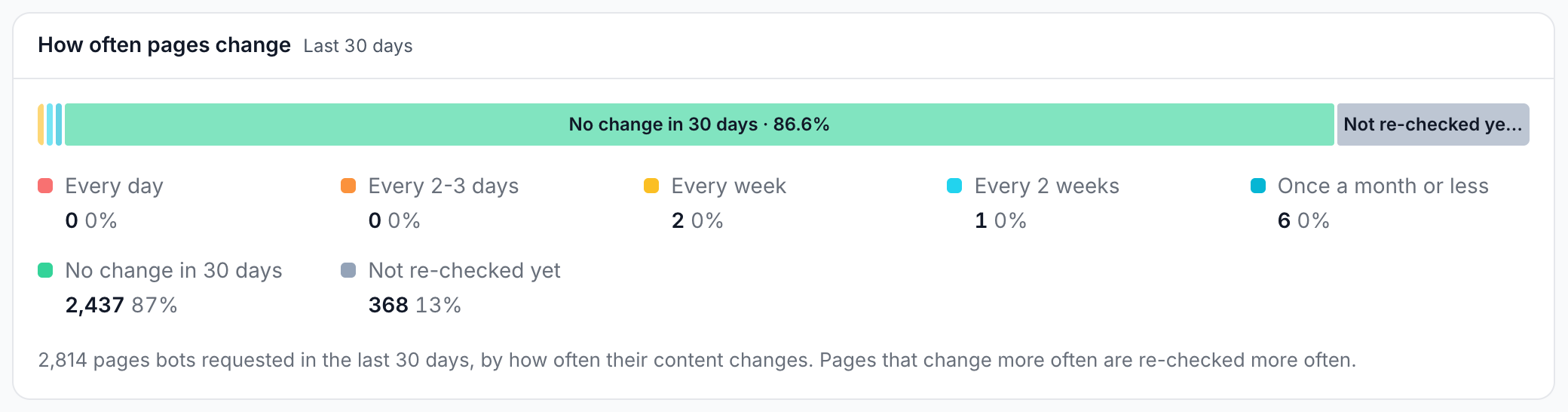
EdgeComet refreshes cached pages before bots ask for them, which gives bots a copy that is both fast and current. Smart Re-cache, the main pre-cache rule, refreshes each page bots request as often as that page changes.
Your Search Console data, sitemaps and Merchant Center feed add signals. A new sitemap URL is cached before bots find it, and a product whose price or stock changes in the feed is re-cached at high priority on the next feed check.
The Cache TTL caps how old a copy can get. The first bot request after a copy expires gets a fresh render or fetch.
How soon bots get a change
How soon a change reaches bots depends on what signals it:
| What changed | When bots get the new version |
|---|---|
| A product's price, availability, title, link, sale price or availability date in your Merchant Center feed | After the next feed check, every hour by default and as often as every 5 minutes, at high priority |
| A page you changed with an Edge SEO rule | Right after you publish, at high priority |
| A page you recache yourself | When the queue reaches it. URLs you submit on Cache > Precache > Queue go in at high priority |
| Your homepage, top Search Console pages and main pages linked from the homepage | On every Smart Re-cache run, every hour by default and as often as every 15 minutes |
| A page bots request that changed | On its next Smart Re-cache re-check. A page that changes often is re-checked often |
| A new URL in your sitemaps | After the next sitemap run, every 12 hours by default |
| Any other page | On its next pre-cache refresh, or at the latest on the first bot request after the Cache TTL, 7 days by default |
While a page waits for its refresh, bots keep getting the current copy. See What bots get while a page refreshes.
Why EdgeComet pre-caches instead of waiting for bots
For most websites, EdgeComet builds copies before bots ask rather than when they ask, for two reasons: speed and load.
A pre-cached page is served in under 15 ms. A page built on request makes the bot wait for a render or for your server, usually seconds. In EdgeComet's tests, the ChatGPT and Gemini fetchers waited 4 to 5 seconds for a page before giving up. See Do GPTBot, ClaudeBot and other AI bots run JavaScript?
Pre-cache also keeps bot load off your website. EdgeComet builds a page once per refresh and serves that copy to every bot that asks, instead of your server answering each bot request. You set how many pages refresh at once with Concurrent re-caches.
How EdgeComet decides what to refresh
EdgeComet decides from how often each page changes and how often bots request it. Smart Re-cache gives each page bots request its own re-check interval: a page that keeps changing is re-checked often, and a page that stays the same is re-checked less and less, up to once per Cache TTL.
EdgeComet sees the content of every copy it stores, which is how it knows which pages change and which stay the same. After a template-wide change, such as a template release, Smart Re-cache refreshes the affected pages sooner. See Bursts.
Spending refreshes on the pages that change also reduces the load on your website. The other pre-cache rules add signals from your own data:
- Search demand: your top pages in Search Console by clicks or impressions. See GSC Re-cache.
- New pages: URLs added to your sitemaps since the last run, freshest
lastmodfirst. See Sitemap Re-cache. - Product changes: products whose details changed in your Merchant Center feed. See Merchant Feed Re-cache.
- Your own changes: pages an Edge SEO publish changed, and pages you recache yourself.
Set up freshness for your site
Turn on Smart Re-cache first. Each data source you connect after that gives EdgeComet more to work with:
- Turn on Smart Re-cache. It refreshes your homepage and main pages every hour by default, and each page bots request as often as it changes.
- Connect Search Console. Your top pages by clicks join Smart Re-cache's priority pages and are refreshed on every run.
- Add your XML sitemaps to Sitemap Re-cache. New pages are cached before bots find them.
- If you sell online, add your Merchant Center feed to Merchant Feed Re-cache.
- Keep a long Cache TTL. Smart Re-cache keeps the pages that change current, which lets you keep a long TTL and still serve current content. See Cache TTL.
Refreshing a page more often does not add to your usage, which counts Googlebot requests. See How the mode affects usage.
Different freshness for different sections
Cache settings apply to the whole website, and you can change them for parts of it:
- The whole website: Cache TTL, cacheable status codes and what happens when a copy expires, under Configuration > Caching > Settings. See Set cache lifetime, status codes and stale content.
- Directories and URL patterns: a URL rule gives matching URLs their own TTL. Its Auto-Recache tab refreshes a URL again after a set interval, from 30 minutes to 24 hours, once one of the bots you pick got its cached copy. For example, a rule for
/products/*with a 1-day TTL keeps product pages current while the rest of the site keeps 7 days. See Different settings for some URLs. - Pre-cache rules: GSC Re-cache, Sitemap Re-cache and Merchant Feed Re-cache take Filters, which let a rule cover one directory, such as
/blog/. Smart Re-cache's Custom URLs add pages from any section to its priority pages.
Keep prices and stock current
For an online shop, the Merchant Center feed is the fastest signal. EdgeComet fetches your feed every hour by default, and as often as every 5 minutes.
Every product page whose price, availability, title, link, sale price or availability date changed is re-cached at high priority on the next check, ahead of other refreshes. The rest of the catalog is refreshed before its copies expire. See Re-cache products when your Merchant Center feed changes. To see which changed products Googlebot, AdsBot and StoreBot fetched again, see Product Feed.
When a change must reach bots now
When bots need a change before the next refresh, such as a corrected article, recache the page yourself:
- One page: Recache on Cache > Precache > Cached URLs, or Re-cache next to the URL in Page Analysis.
- A list of pages: up to 500 URLs on Cache > Precache > Queue, at high priority.
- From your CMS or deploy pipeline: call the API when you publish. See Recache and invalidate pages with the API.
See Recache, invalidate and flush cached pages for the steps.
What bots get while a page refreshes
Bots keep getting the current copy until the new one is stored, so a refresh never leaves a page uncached.
When a fresh render or fetch fails, for example because your server returns a 5xx error, bots get the expired copy for up to the Stale TTL, 24 hours by default. See Expired copies and origin outages.
Check how fresh your copies are
- One request: the
EC-Cache-Ageheader gives the age of the copy a bot got, in seconds. See Check the headers bots receive. - All bots: Cache Age Distribution on Cache > Overview shows how old the copies bots got were. See How old are the copies bots get?
- One URL: expanding a URL on Cache > Precache > Cached URLs shows its TTL and Cache Age.
- Pre-cache runs: the Pre-cache rules card on Cache > Precache > Statistic shows each rule's last and next run. See Is pre-cache working?
What freshness does not cover
- It does not make bots crawl sooner. Pre-cache makes the copy fresh before a bot arrives. It does not notify Google or Bing, for example through IndexNow.
- It copies what your server sends. A refresh stores the page as your site serves it at that moment, so a page that is outdated on your site is outdated in the cache too.
Where to find it
In the dashboard: Configuration > Caching for the cache settings and pre-cache rules, Cache > Precache for runs, the queue and cached URLs, and Cache > Overview for the age of the copies bots get.