

Change log: every SEO change with before and after values
The Change log tab of the EdgeComet Changes report lists every logged change with its value before and after, or every changed page with all its changes. Also called SEO change history.
It is a Data Explorer table: the filters and period work as in the rest of Data Explorer, and in Changes mode you choose columns and export. The table reads the page change log, and the report's filter carries over as filter rows.
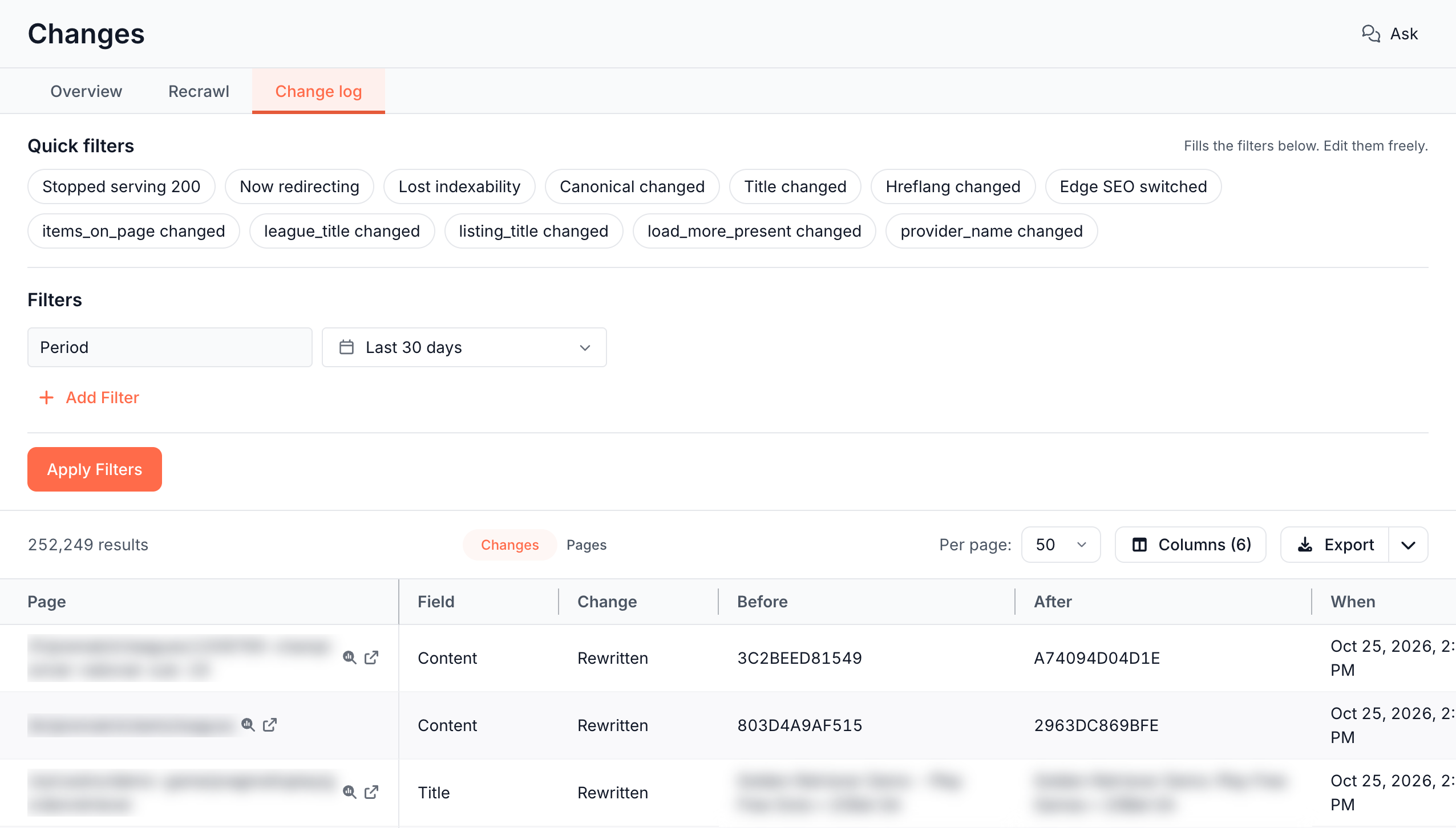
Read the log by change or by page
The Changes and Pages switch above the table picks the mode:
- Changes: one row per change. Use it for the old and new values, and to export.
- Pages: one row per changed page, with every field that moved on it and its recrawl state.
Changes: one row per change
Each row is one change to one field on one page. An edit that EdgeComet saw on the mobile and the desktop copy in the same minute is one row. Rows are listed newest first.
The default columns are Page, Field, Change, Before, After and When. Columns adds:
- Detail: both values of a status code or index status change, such as "200 > 404", the entries added and removed from a list, or the similarity of a content change, such as "58% similar".
- Dimensions: the cached versions that saw the change, such as mobile and desktop.
- Edge SEO: whether an Edge SEO rule served the copies. See Edge SEO in the log.
- Previous: the last time EdgeComet saw the old value.
Change names the kind of change: Filled, Emptied, Rewritten, Changed, Added, Removed or Replaced. For lists, such as structured data types, hreflang or H1 headings, Before and After put one entry per line and mark the entries the other side lacks.
When is the first time EdgeComet saw the new value. The change happened between Previous and When.
For Content, Before and After show the fingerprints of the two copies of the page body, such as "3C2BEED81549", and Detail shows how similar they are.
Pages: one row per changed page
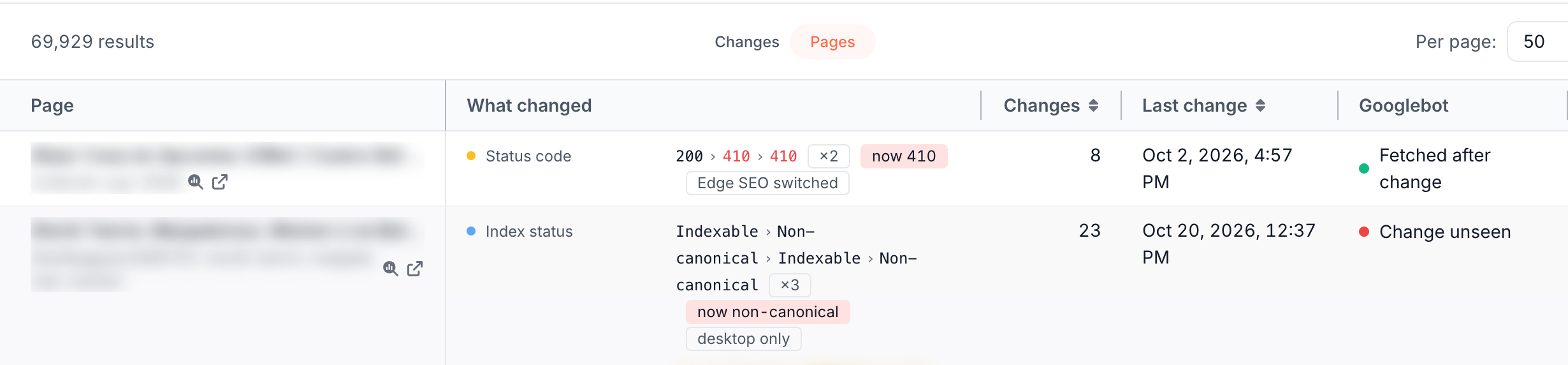
Each row is one page with every field that changed on it in the period. The columns are Page, What changed, Changes, Last change, and the page's recrawl state for Googlebot and OpenAI Search.
Rows come in order of consequence: a page that stopped serving 200 comes before one whose title was rewritten. Click Changes or Last change to sort by them instead.
What changed has one line per field, with the values in order, such as "200 › 410", and marks:
- ×N: the field changed N times in the period. At 3 or more, the tooltip marks the field unstable.
- Where it stands now: "now 404", "still 404", "now 301", "answering again", "now blocked", "now non-canonical", "now empty" or "back to original".
- {version} only: only that cached version saw the change, such as "desktop only".
- Edge SEO switched: an Edge SEO rule switched on or off across the change. See Edge SEO in the log.
Click a row to see the page's whole history for the period under it: "All changes to this page in the period", newest first, with show all for the older ones. It shows every change, including the ones the filters left out.
Start from a quick filter
Quick filters above the filter rows set up a ready view: "Fills the filters below. Edit them freely."
| Quick filter | What it shows |
|---|---|
| Stopped serving 200 | Changes where the status code left 2xx |
| Now redirecting | Pages that became a redirect |
| Lost indexability | Pages that became blocked by noindex or non-canonical |
| Canonical changed | Every canonical URL change |
| Title changed | Every title change |
| Hreflang changed | Every hreflang change |
| Edge SEO switched | Changes where an Edge SEO rule served one side only |
| {field} changed | Every change to one tracked custom extraction field |
| Unstable pages | Only unstable pages. Pages mode only |
Filters
Add Filter offers these filters, besides the Period:
- URL: the page address. See Operators for each kind of field.
- What happened: what the change did to the page. See What happened.
- Page type: the segment the page belongs to, as on the Changes table. See Page types.
- Release: one URL pattern of a site release, labelled "{pattern}: {release name}". It narrows to that pattern's pages and fields from the release day on.
- Field and Change: which field changed, and the kind of change.
- Before, After and Detail: text in the old value, the new value or the detail. They match the whole stored value, not only the part the table shows.
- Unstable pages: only unstable pages. Pages mode only.
- Recrawl state and Recrawl class: a crawler's state, such as "Googlebot: Change unseen", and whether Recrawl counts the page: Counted, Excluded page type, Data changes only or No longer indexable. Pages mode only. See Which changed pages Recrawl counts.
- Edge SEO: No rule, Rule on one side or Rule on both sides.
- Bot log filters: pages with requests that match a Bot log rule in the period, such as pages Googlebot requested. Bot log: Requested keeps the pages that had at least one matching request.
The Period defaults to Last 30 days. A custom period takes dates and times in UTC, up to 365 days. See Set the period.
What happened
What happened filters by the outcome of a change. Pick several to match any of them:
| Group | Outcome | Matches |
|---|---|---|
| Availability | Stopped serving 200 | The status code left 2xx |
| Availability | Became an error (4xx or 5xx) | The status code changed to a 4xx or 5xx |
| Availability | Became a redirect | The status code changed to a 3xx |
| Availability | Redirect target changed | The redirect points somewhere else |
| Indexing | Became blocked (noindex) | Index status went from Indexable to Blocked, or meta robots gained noindex or none |
| Indexing | Became non-canonical | Index status went from Indexable to Non-canonical |
| Indexing | Became indexable | Index status went back to Indexable from a non-indexable status |
| Page text | Emptied | The title, meta description or H1 became empty |
| Head tags | Lost entries | Structured data or hreflang lost entries |
| Head tags | Gained entries | Structured data or hreflang gained entries |
The Stopped serving 200 and Lost indexability cards on the Overview tab use the same outcomes. The card Stopped serving 200 also counts Redirect target changed.
Edge SEO in the log
Each change records whether an Edge SEO rule served the copies on either side of it:
- No rule: no rule served either copy.
- Rule on one side: a rule was switched on or off between the two copies. The rule itself may be the change. Pages mode marks it Edge SEO switched: "An Edge SEO rule switched on or off across this change, which makes it a candidate for what moved".
- Rule on both sides: a rule served both copies and stayed switched on.
Open the log from a report number
Most numbers about changes open the Change log on exactly their pages, with the period and filter they came from. The view is named after the number, such as Lost indexability:
- Overview tab: View on a card, View {N} pages on an opened row, a red Not fetched count, and View rows for a day picked on the Timeline. See Review SEO changes across your site by priority.
- Recrawl tab: a band of a bar, a count or a page type. See Did Googlebot and AI bots refetch your changed pages?
- A release: View {N} pages on a page type. See Every change, with example pages.
- Page Analysis: View rows on the Recent changes card lists one page's changes. See Track SEO changes on one page against its Google traffic.
- Alerts: a Pages changed incident links to the changes of the fields it watches. See Why an alert fired and what to do next.
Export the log
In Changes mode, Export downloads the rows as a CSV file or opens them in Google Sheets. Export history lists them as Change log. See Export Data Explorer tables to CSV or Google Sheets.
Where to find it
In the dashboard: Changes, tab Change log.