

Deploy, roll back and restore settings
EdgeComet saves every change to System Settings and Caching > Settings as a draft, and bots see nothing until you deploy it. A deploy applies the whole draft to live bot traffic at once.
Deployment History keeps every deploy, so you can see who changed what and restore an earlier configuration.
What needs a deploy
These changes are saved as a draft and need a deploy:
- Configuration > System Settings: General, Dimensions, Rendering, URL Rules and Advanced.
- Configuration > Caching > Settings.
Pre-cache rules on the other Caching tabs take effect when you save them. Edge SEO rules have their own preview and publish flow.
Deploy your changes
After you click Save on any of those tabs, a yellow banner appears at the top: "You have unpublished configuration changes", with the changed sections under Changed, such as Dimensions or Caching.

Click Deploy in the banner. The Deploy Configuration dialog reads "This will push your current configuration to the rendering backend. All changes will take effect immediately for live traffic." and lists each changed field with its Previous and New value.
Click Deploy.
The banner then reads "Last deployed" with the date and your name, and View history. The new settings apply to the next bot request. Pages already in the cache keep their copy until it expires or you recache it.
Discard unpublished changes
Click Rollback in the banner. The Rollback Configuration dialog reads "This will discard all unpublished changes and restore the configuration to the last deployed state." Rollback resets the draft only, so live traffic does not change.
Restore an earlier configuration
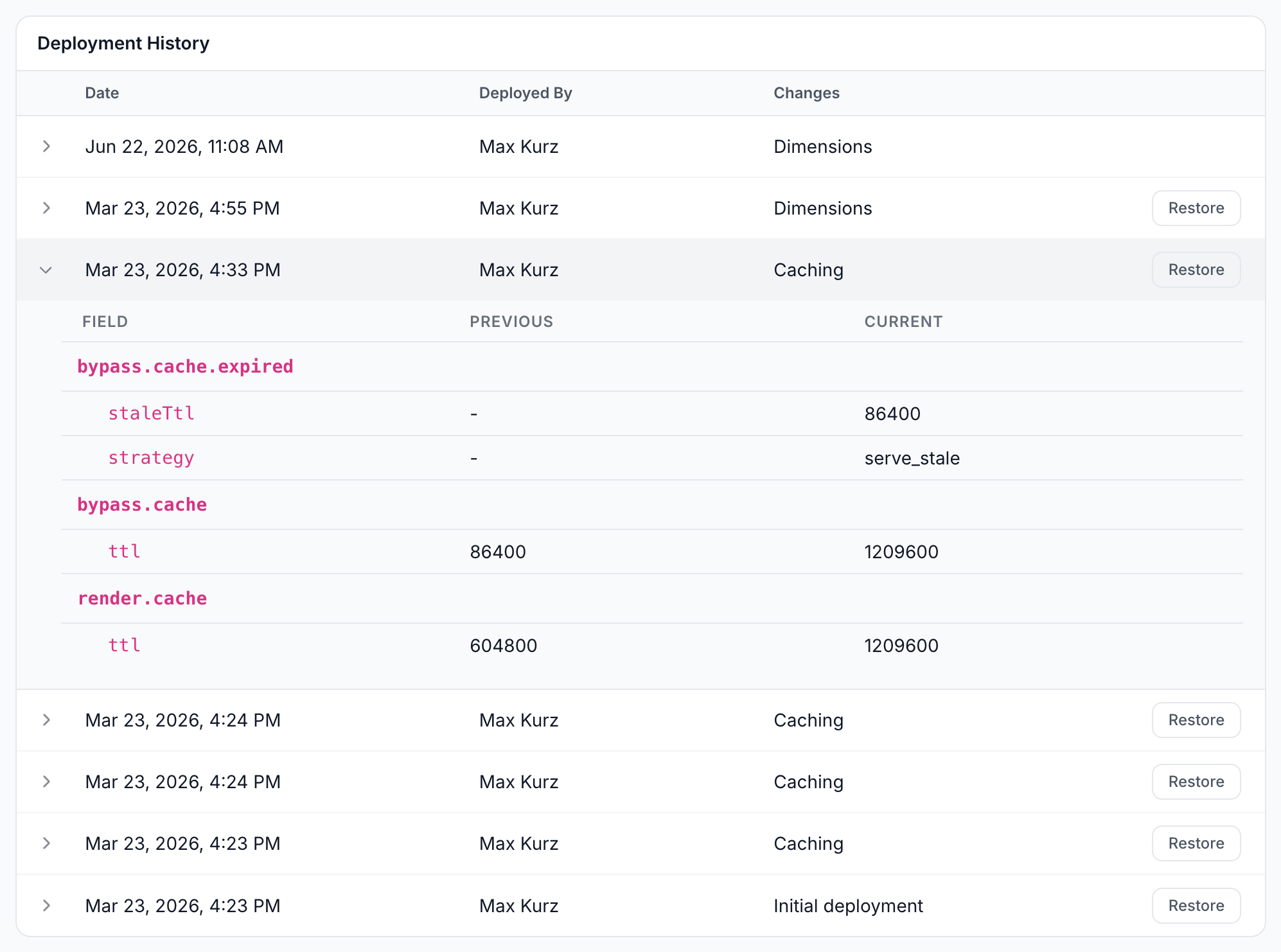
Configuration > System Settings > Deployment History lists every deploy with its Date, Deployed By and Changes: "Initial deployment", the changed sections, or "No changes". It loads 20 deploys at a time, with Load more.
- Click a row to see each changed field with its Previous and Current value.
- Click Restore on the deploy you want back. Every row but the newest has one. The dialog reads "This will restore the configuration from this deployment as a draft. You will need to deploy to push changes live."
- Confirm. The page shows "Configuration restored. Deploy to push changes live."
- Click Deploy in the banner.
The General tab
Configuration > System Settings > General identifies the website and sums up its configuration.
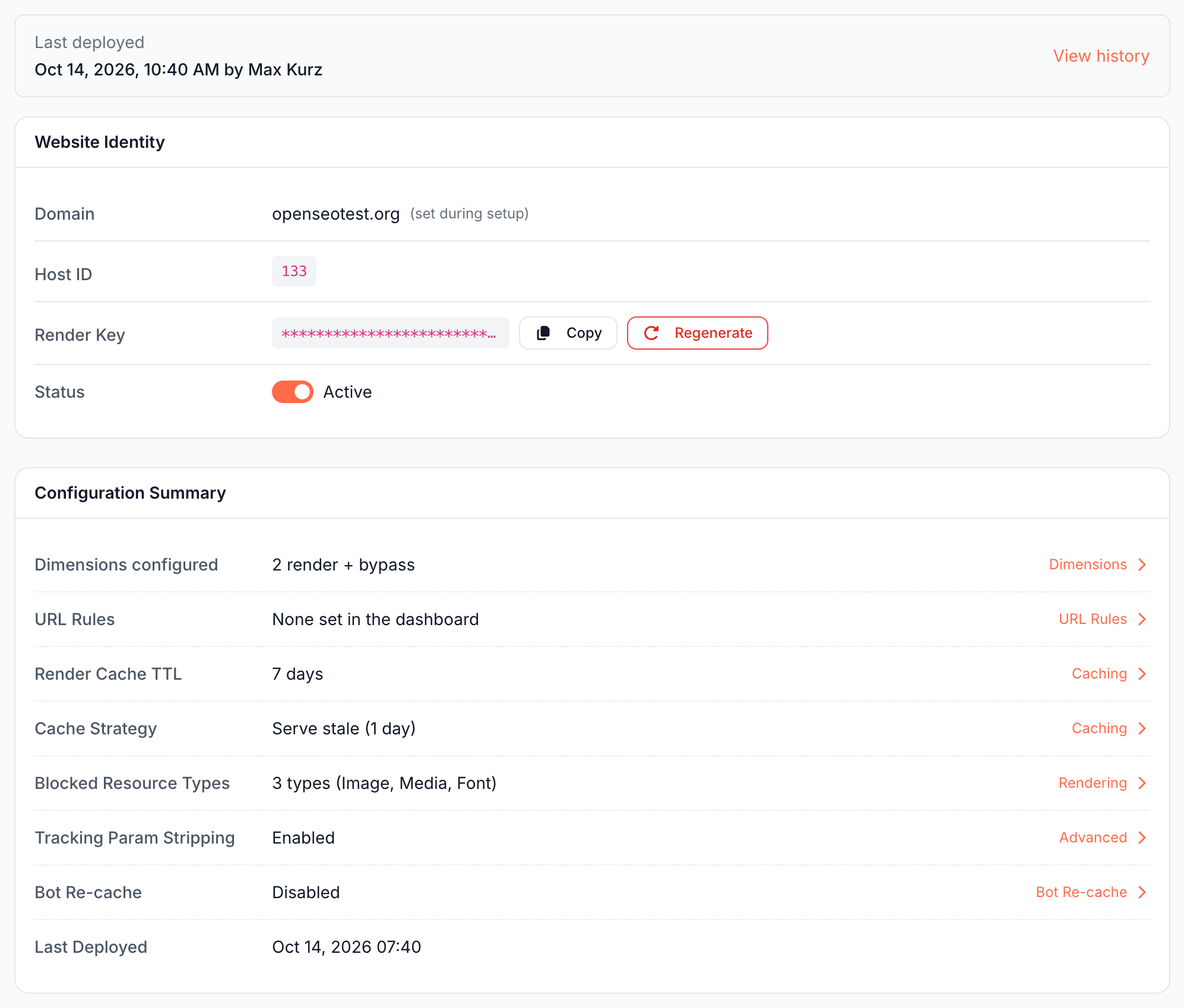
- Website Identity: the Domain, set when you added the website, the Host ID, the masked render key with Copy, and the Status switch, Active or Inactive, which deploys like any other change.
- Configuration Summary: the number of dimensions, URL rules, cache lifetime and expiry, blocked resource types, tracking parameter stripping and the last deploy, each linking to its tab. URL Rules reads "None set in the dashboard" until you add a rule.
Regenerate next to the render key does not change the key at once. It opens Rotate the render key, a request to support, because "Rotating the key re-signs every request from our renderer and invalidates the key baked into your Cloudflare worker and firewall rule".
If it does not work
The change has no effect
The banner still reads "You have unpublished configuration changes". Click Deploy.
"Deploy failed. Please try again."
EdgeComet could not apply the configuration, and your draft is kept. Deploy again, and contact [email protected] if it keeps failing.
"The cluster rejected the URL rule for ..." or "The URL rule for ... forces the dimension ..."
A URL rule is invalid or uses a dimension the website no longer renders. Fix or delete it under URL Rules, then deploy again.
"The cluster holds URL rules that were changed outside the dashboard. Contact support before deploying."
Contact [email protected]. A deploy would overwrite rules that support set for your website.