

How EdgeComet serves search and AI bots
EdgeComet serves complete, cached HTML to search engines and AI bots, and records every request it serves. It either renders JavaScript pages in headless Chrome or caches your server's own HTML, a setup also called prerendering or dynamic rendering.
Your CDN routes crawler requests to EdgeComet, and human visitors keep reaching your site directly.
The record of what each bot asked for and received drives EdgeComet's reports, audits and alerts.
Where EdgeComet sits in the request path
Your CDN or proxy checks each request's user agent and sends crawlers to EdgeComet. See how routing works. Inside EdgeComet, each bot request goes through these steps:
- Authenticate. The request must carry your site's render key, which your routing rule adds.
- Match a device profile. EdgeComet matches the bot's user agent to a dimension, a device profile with its own viewport and its own cached copy of each page. Googlebot Smartphone gets the mobile copy and Googlebot Desktop gets the desktop copy.
- Apply URL rules. A rule can render or bypass a URL, block it, or answer with a fixed status code such as 404 or 410.
- Serve. A fresh copy in the cache is served at once. Otherwise EdgeComet renders the page or fetches it from your origin, stores the result and serves it. When several bots ask for the same uncached page at once, EdgeComet runs one render and serves it to all of them.
- Record. EdgeComet records the request, the bot, the outcome and, for pages it fetched or rendered, an SEO snapshot of the page.
What bots receive
What a bot receives depends on the website's serving mode and the dimension its user agent matches.
| Dimension action | The bot receives |
|---|---|
| Render | The page after headless Chrome ran its JavaScript. By default, executable scripts are removed and JSON-LD structured data is kept. Used for search engines and AI bots on Cache + Render sites |
| Bypass | Your server's HTML, unchanged by rendering. Used for every bot on Cache-only sites, and for bots no render dimension matches |
| Block | A 403 Forbidden response |
A rendered copy carries the same content your visitors see, built before the bot asks. See Is prerendering for bots cloaking?
By default, a Cache + Render website renders a mobile copy at 412 x 915 pixels for Google and Bing mobile crawlers, AI bots, messaging apps and social networks, and a desktop copy at 1920 x 1080 for Google and Bing desktop crawlers. Every other user agent gets the bypass copy.
A render waits until the page's network requests settle, for up to 15 seconds by default. You can change the wait, the timeout and page scrolling under Configuration > System Settings > Rendering. See Render settings.
Every copy also carries:
- The status code your page returned, including redirects.
- Selected response headers from your server:
Content-Type,Cache-Control,Expires,Last-Modified,ETag,Location,X-Robots-TagandLink. - Any Edge SEO changes that apply to the URL.
EC-headers that say where the response came from. See Check the headers bots receive.
PDFs, images, video, audio and other binary files are never cached. EdgeComet passes them through from your origin.
How fast bots get a page
A cache hit is served in under 15 ms. This is the serve time EdgeComet records for each request, which does not include the hop from your CDN to EdgeComet or the network between the bot and your CDN.
To see it for your site, open Cache > Overview. Avg Response is the average time for responses served from the cache.
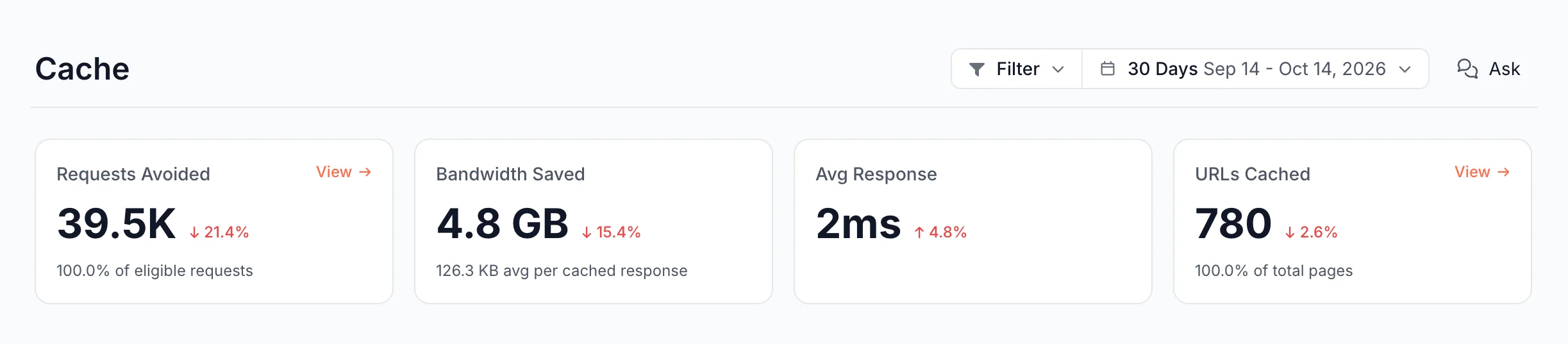
A cache miss takes as long as the render or the origin fetch, usually seconds. Pre-cache rules render or fetch pages before bots ask, so more requests are cache hits. See How fast bots get a cached page for what the number measures and why it matters.
Does EdgeComet slow down your site or change Core Web Vitals?
EdgeComet does not slow down your site, and it can improve your Core Web Vitals by taking bot traffic off your origin server. Human visitors never pass through EdgeComet, so it adds no step to their page loads.
Without EdgeComet, your server answers every Googlebot, Bingbot and AI bot request itself. With EdgeComet, bots get cached copies, so that server capacity goes to your human visitors.
Google measures Core Web Vitals from "actual users visiting your URL" (Search Console Help). With less bot load, your server sends those visitors the first byte sooner, which shortens Largest Contentful Paint, one of the three Core Web Vitals. The gain is largest when bots send a large share of your requests or your pages are slow to build.
Bots get faster pages too. A cache hit is served in under 15 ms, and Google raises its crawl capacity limit for a site that answers quickly and steadily. See Server speed and the crawl capacity limit.
The only EdgeComet code that can run in visitors' browsers is the optional Edge SEO snippet. It is a script tag in your page <head> that applies Edge SEO changes for visitors. You install it only if you want visitors to see those changes.
A cached page is served without a request to your origin. EdgeComet requests a page from your origin when:
- The cache has no fresh copy of the page.
- A pre-cache rule refreshes the page.
- On a Cache + Render site, a bot that no render dimension matches asks for a page, unless the bypass cache is turned on under Configuration > Caching.
What EdgeComet can and cannot see
EdgeComet records every request it serves:
- The bot, its user agent and whether its IP address is verified.
- The URL, status code, response time, cache state and whether the page was rendered.
- For pages it renders or fetches, an SEO snapshot: title, meta description, canonical, headings, robots directives, structured data, hreflang, links and word count.
It also reads the sources you connect: Google Search Console, sitemaps and Merchant Center product feeds. See How EdgeComet collects data.
EdgeComet does not see:
- Human visitors. Their requests never reach EdgeComet.
- Requests your routing sends to your origin. With the Cloudflare integration, that includes images, scripts, stylesheets,
robots.txtand XML sitemaps. - Bots that skip your CDN, for example by requesting your origin's IP address directly.
What happens if EdgeComet or your origin is down
If EdgeComet does not answer, the Cloudflare Worker fetches the page from your origin. It does the same when EdgeComet's response has no EC-Source header, has a 5xx status or takes longer than 60 seconds. On other setups, configure your proxy to send the request to your origin in the same cases. See What happens when something fails.
If a render fails or times out, EdgeComet serves the last cached copy when it still has one. Otherwise it serves your server's HTML without rendering.
If your origin is down, fresh cached copies are served as usual. An expired copy is served as a fallback when a fresh render or fetch fails, for up to the stale period set under Configuration > Caching > Settings. Bots keep reading your cached pages during the outage.
How EdgeComet differs from a prerender service
A prerender service renders JavaScript pages and caches them for bots. EdgeComet does that, and also:
- Caches server-rendered sites without rendering them, in Cache-only mode.
- Records every bot request with the page it received, so you can see how Googlebot and each AI bot crawl your site without server log files. See Log Analyzer.
- Audits your site from the pages it served to bots and pre-cached, instead of running a separate crawler. See Evergreen Crawl.
- Joins Search Console clicks and impressions to the same URLs.
- Changes titles, meta tags, canonicals, redirects and page content at the edge with Edge SEO.
- Alerts you when bots start getting errors or pages change, and ranks issues to fix on the Action Board.
For a feature-by-feature comparison, see EdgeComet compared with a standalone prerender service.
How to pause or remove EdgeComet
To stop serving bots through EdgeComet, remove the routing:
- Cloudflare automatic install: open Configuration > Connections > CDN integration, click Manage connection, then Disconnect. EdgeComet removes its Worker, routes and firewall rule from your zone. See Remove EdgeComet from Cloudflare.
- Any other setup: remove the routing rule from your CDN or proxy configuration.
Bots then get your pages from your origin, and EdgeComet stops recording new requests. To reconnect later, install the routing again. To delete a website or your account, contact [email protected].