

How to verify Googlebot and AI bot IP addresses
Bot verification in brief
Bot verification, also called bot IP verification or fake bot detection, checks that a request claiming to come from Googlebot, Bingbot or an AI crawler such as GPTBot really comes from that operator's network.
The user agent, the name a client sends with each request, is plain text, so anyone can send Googlebot's. The IP address is harder to fake, because the response has to reach it.
Two methods check the address: a reverse DNS lookup confirmed by a forward lookup, and a match against the IP ranges the operator publishes.
EdgeComet uses published ranges on every request from a bot that can be verified, and stores the verdict with the request: Verified, Fake, Unverifiable or Error.
Why it matters for search and AI bots
Google describes verification as useful "if you're concerned that spammers or other troublemakers are accessing your site while claiming to be from Google." Fake bots cause three problems:
- Wrong crawl data. A scraper that sends Googlebot's user agent counts as Googlebot in any tool that trusts the name. Crawl volume and crawl waste figures stop matching what Google did.
- Open doors. A firewall or CDN rule that lets "Googlebot" through by user agent lets every impersonator through too.
- Cost. A fake request takes the same server or rendering work as a real one, and the scraper behind it gets a copy of your content.
Two ways to verify a bot
Google documents both methods: command line tools for one-off lookups, "sufficient for most use cases", and for large scale lookups "an automatic solution to match a crawler's IP address against the list of published Google IP addresses."
Reverse DNS and forward DNS lookup
A reverse DNS lookup asks which host name an IP address belongs to. Whoever controls an address can set its reverse name to anything, so a forward lookup on that name must lead back to the same address. Google's steps:
- Run a reverse DNS lookup on the IP address from your logs.
- Check that the name ends in
googlebot.com,google.comorgoogleusercontent.com. - Run a forward DNS lookup on that name.
- Check that it returns the original IP address.
host 66.249.66.1
# 1.66.249.66.in-addr.arpa domain name pointer crawl-66-249-66-1.googlebot.com.

host crawl-66-249-66-1.googlebot.com
# crawl-66-249-66-1.googlebot.com has address 66.249.66.1
Bing documents the same two steps for names ending in search.msn.com, and Yandex for yandex.ru, yandex.net and yandex.com. The method costs two DNS queries per address and works only where the operator documents the host names its crawlers use.
Match the address against published IP ranges
Google, Bing, OpenAI, Anthropic and other operators publish their crawler addresses as JSON files of IP ranges in CIDR notation: a starting address and a prefix length that sets the size, such as 66.249.66.0/27, where /27 covers 32 addresses.
Download the file for the bot the request claims to be, and check whether the address falls inside one of its ranges. One download covers any number of requests. The lists change, so refresh them: Bing asks you to "Refresh this list daily as we can change this list any time."
import ipaddress
import json
import urllib.request

ip = ipaddress.ip_address("66.249.66.1")
url = "https://developers.google.com/static/crawling/ipranges/common-crawlers.json"
prefixes = json.load(urllib.request.urlopen(url))["prefixes"]
ranges = [ipaddress.ip_network(p.get("ipv4Prefix") or p.get("ipv6Prefix")) for p in prefixes]
print(any(ip in r for r in ranges))  # True
What Google, Bing, OpenAI, Anthropic and Yandex publish for verification
What the operators' own pages describe:
| Operator | DNS lookup | Published IP ranges |
|---|---|---|
Reverse DNS to googlebot.com, google.com or googleusercontent.com, then forward DNS | Five files: common crawlers such as Googlebot, special crawlers such as AdsBot, two lists of user-triggered fetchers, and user-triggered agents | |
| Microsoft Bing | Reverse DNS to a name ending in search.msn.com, then forward DNS | bingbot.json, to refresh daily |
| OpenAI | Not described | One file per bot, such as gptbot.json, searchbot.json and chatgpt-user.json |
| Anthropic | Not described | bots.json: "If a crawler has a source IP address on this list, it indicates that the crawler is coming from Anthropic." |
| Yandex | Reverse DNS to yandex.ru, yandex.net or yandex.com, then forward DNS | None |
How EdgeComet verifies bots
EdgeComet uses published IP ranges, the automatic method Google documents, and stores the verdict with each request. Because EdgeComet sits in the bot request path, every request is checked as it is recorded: you run no DNS lookups, export no logs and keep no lists up to date.
Server log analysis can run the same range check, but only on logs you export, with lists the tool must keep current.
IP validation: the check EdgeComet runs on each request
IP validation is EdgeComet's name for this check. Its result is the IP Validation field of each request.
- Operators checked. EdgeComet reads 25 range lists from 12 operators: Google, Microsoft Bing, OpenAI, Anthropic, Perplexity, Apple, Common Crawl, DuckDuckGo, Moonshot AI (Kimi), Mistral AI, Reflection AI and Keenable. For YouBot, it checks the range You.com documents. AI crawler user agents and search engine crawler user agents mark which bots are checked.
- The claimed bot picks the list. A request that names ClaudeBot is checked against Anthropic's ranges only.
- Lists refresh every 24 hours. If a download fails, EdgeComet keeps the last list it loaded, so an outage at the operator does not turn real crawlers into fakes.
- The address comes from your CDN. Your CDN or proxy passes the bot's original IP address to EdgeComet in a request header. The EdgeComet integrations set this up for you.
Each request gets one of four verdicts, shown under these labels in the IP Validation column and filter of Data Explorer > Bot log.
Verified bot: the address belongs to the bot's operator
A verified bot request is one whose IP address falls inside the ranges the bot's operator publishes. A request that names Googlebot from 66.249.66.1, inside Google's 66.249.66.0/27, is Verified.
Treat verified requests as real crawl data. The first response EdgeComet serves to a verified bot makes your website live (see What "live" means), and integration health counts verified bot requests only.
Fake bot: the address is outside the claimed bot's ranges
A fake bot request, also called a spoofed or impersonated bot, is one that names a bot EdgeComet can verify, such as Googlebot, GPTBot or ClaudeBot, from an IP address outside every range that bot's operator publishes. An example is a scraper on a rented cloud server that sends Googlebot's user agent. Its verdict is Fake.
- Most reports leave fake requests out, so they do not inflate your crawl numbers. See Where do I see fake bots.
- Fake Googlebot requests do not count toward the Googlebot requests in your usage.
- Blocking Googlebot's user agent to stop a fake would block the real Googlebot too. To stop impersonators before they reach your site, use a firewall or CDN rule that checks the IP address, not only the user agent.
Unverifiable: no published list to check against
Unverifiable means EdgeComet holds no published range list for that bot, which leaves nothing to check the address against. Requests from Yandex, Baidu, Meta, Bytespider, SEO tools, social network fetchers and monitoring services always record Unverifiable.
MistralAI-Training and Exa's bots record Unverifiable too: Mistral AI publishes no range list for that crawler, and Exa signs its requests with Web Bot Auth instead of publishing IP ranges.
Read it as unknown, not as suspicious. These requests stay in your reports, but they never make a site live.
Validation error: no address to check
Error means EdgeComet had no readable IP address for the request, so it could not run the check. A few such requests need no action. If many requests show Error, contact EdgeComet support.
Common questions
Where do I see fake bots in EdgeComet?
Most reports leave fake requests out. These places show them:
- Log Analyzer > Bad Bots groups them by the bot they claim to be in the Impersonated Bots card, and counts them as High Risk (Fake) in Requests by Risk Tier. See Detect fake Googlebot and other bad bot traffic.
- Log Analyzer > Overview shows them as their own Fake Bots family in the Bot Activity chart, and the Bot Breakdown tab lists them as a separate Fake Bots category.
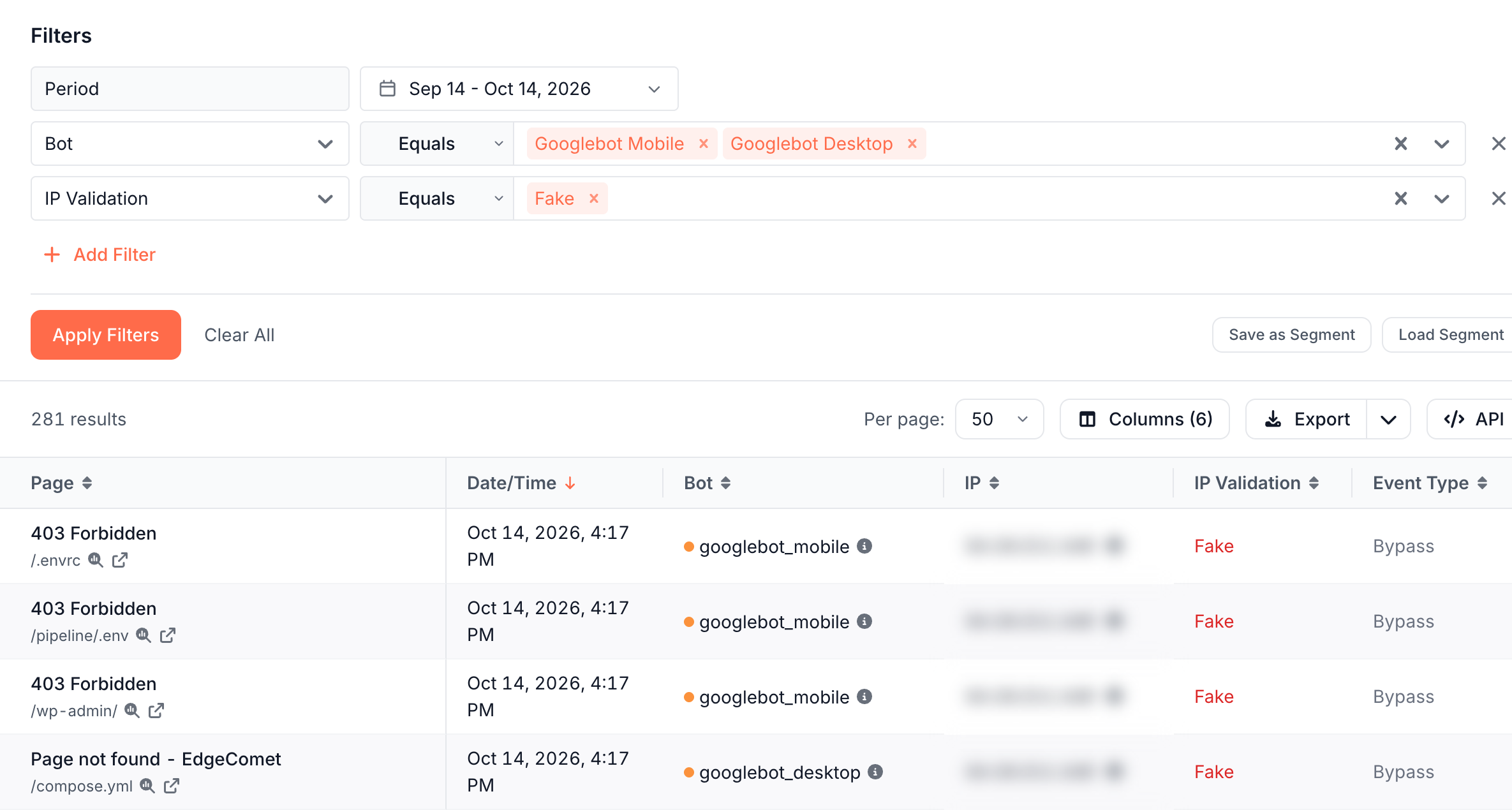
- Data Explorer > Bot log hides them by default. Set the IP Validation filter to Fake, or the Bot Type filter to Fake Bots, to list them, and add the IP column to see their addresses.
The built-in Fake search-engine traffic alert warns you when fake requests rise sharply. See Fake search-engine traffic.
Why are Yandex requests always unverifiable?
Because Yandex publishes no IP ranges. Its documentation says its bots use "IP addresses that change frequently. Therefore, their list is not disclosed." Yandex documents a DNS check instead: the reverse name must end in yandex.ru, yandex.net or yandex.com, and a forward lookup must return the same address.
Does GPTBot use fixed IP addresses?
No. GPTBot crawls from IP ranges that OpenAI publishes in gptbot.json, and OpenAI publishes separate lists for OAI-SearchBot, ChatGPT-User and OAI-AdsBot. The ranges change, so check against the current copy.
In EdgeComet's analysis of 484 published subnets in February 2026, GPTBot's list held 20 subnets, all in the United States, while ChatGPT-User's held 224 subnets in 15 countries. On October 14, 2026, gptbot.json listed 18.
Can a verified bot still be unwanted?
Yes. Verification proves who sent a request, not that you want it. A verified GPTBot may collect pages you would rather keep out of AI training, and a verified Googlebot can spend its visits on parameter URLs that waste crawl budget.
- To opt out of an AI crawler, use robots.txt, the opt-out OpenAI and Anthropic document. See Which robots.txt tokens control each AI bot.
- To stop a bot at EdgeComet, match its user agent to a dimension with the Block action, which answers
403 Forbidden, or block specific URLs with a URL rule. See What bots receive.
What if every Googlebot request shows as a fake bot?
Check which address EdgeComet records:
- In Data Explorer > Bot log, set IP Validation to Fake and Bot to Googlebot Mobile and Googlebot Desktop, then add the IP column.
- If the addresses belong to your CDN or proxy rather than to Google, your routing does not pass the bot's original address to EdgeComet. Check your CDN setup against the integration guide.
- If it matches, add the Request ID column and send a few request IDs to [email protected].