

Prerender JavaScript pages for Googlebot and AI bots (dynamic rendering)
EdgeComet renders your JavaScript pages in headless Chrome, caches the finished HTML and serves it to search engines and AI bots. A bot that never runs JavaScript still reads your content, links and structured data. Also called prerendering, dynamic rendering or server-side rendering for bots.
Your app stays as it is: no server-side rendering rewrite and no change for human visitors.
How rendering works
When a bot requests a page that has no fresh copy in the cache, EdgeComet opens it in headless Chrome, waits until the page is ready, captures the HTML and stores it.
- Pick the device profile. The bot's user agent matches a dimension that sets the viewport and the user agent Chrome renders with, such as a 412 x 915 mobile screen for Googlebot Smartphone.
- Load the page. Chrome loads the page from your server with all its scripts, skipping the resource types you block. Each render starts with no cookies and bypasses the page's service worker.
- Wait until it is ready. Chrome waits for the Wait For Event, then for any Additional Wait, for up to the Render Timeout.
- Capture and clean the HTML. EdgeComet captures the DOM as HTML and, with Strip Scripts on, removes executable scripts while keeping JSON-LD structured data.
- Cache and serve. The HTML is stored with the status code and served to this bot and every later bot in the same dimension. When several bots ask for the same page at once, one render serves them all.
Every request Chrome makes to your server carries the X-Edge-Render header, which your routing uses to send it straight to your server instead of back to EdgeComet.
If a render fails, EdgeComet serves the last cached copy when it has one, or your server's HTML without rendering. Bots get a page either way. See What happens if EdgeComet or your origin is down.
Pre-cache rules can run the render before any bot asks, so bots get the finished page from the cache. See Pre-cache pages before bots request them.
Render settings
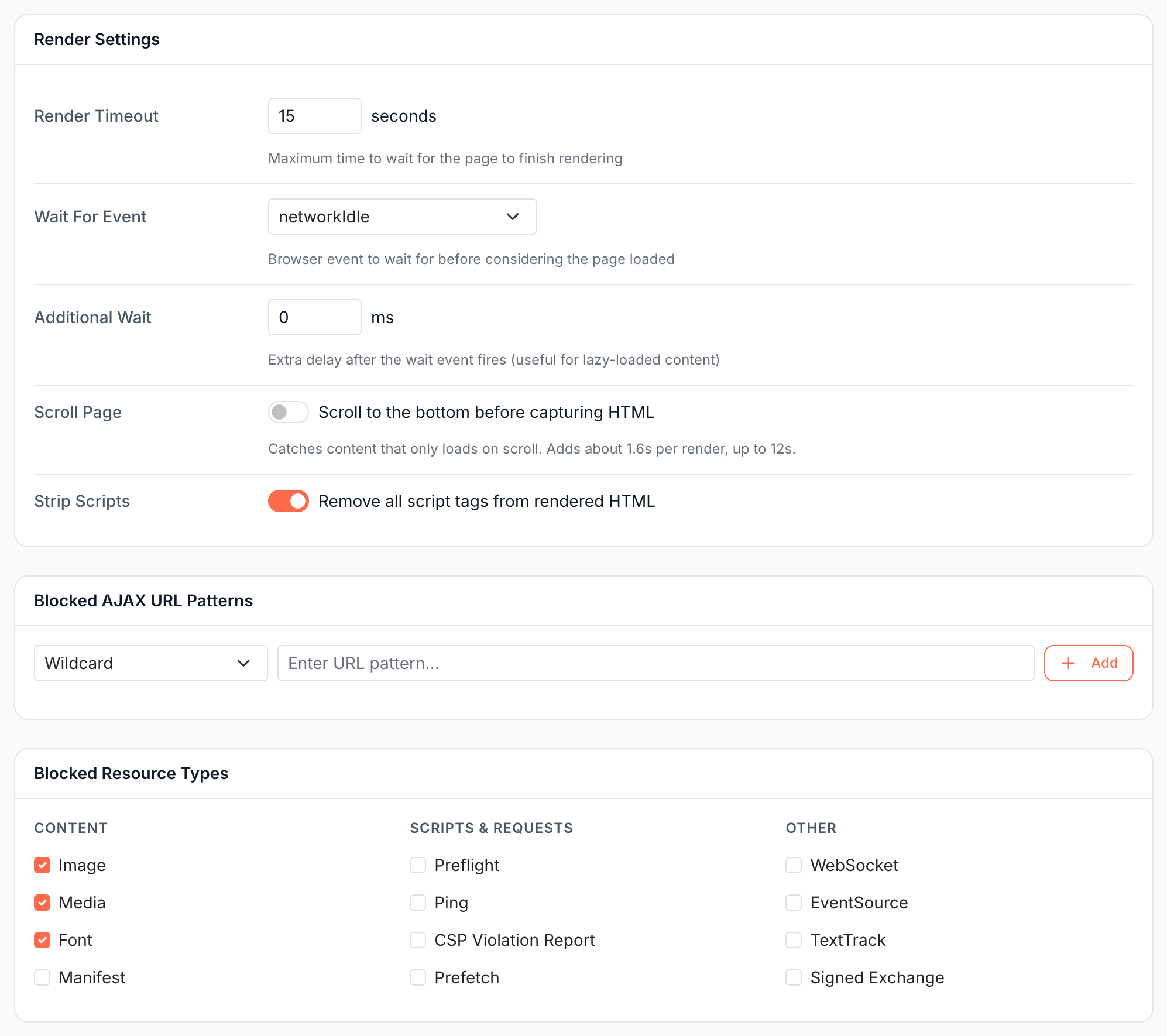
Configuration > System Settings > Rendering holds the render settings for the whole website. Changes are saved as a draft and go live when you deploy them. See Deploy, roll back and restore settings.
| Setting | Default | Allowed values |
|---|---|---|
| Render Timeout | 15 seconds | 5 to 120 seconds |
| Wait For Event | networkIdle | See Wait For Event |
| Additional Wait | 0 ms | 0 to 30,000 ms |
| Scroll Page | Off | On or off |
| Strip Scripts | On | On or off |
| Blocked AJAX URL Patterns | None | URL patterns, up to 500 characters each |
| Blocked Resource Types | Image, Media, Font | 12 types |
When the page counts as ready
Wait For Event decides when Chrome captures the page:
| Value | Chrome captures when |
|---|---|
DOMContentLoaded | The HTML is parsed. Fastest, and misses content that scripts add later |
load | The page and its images, scripts and stylesheets have loaded |
networkIdle | Chrome's lifecycle event for a page with no open network requests for a moment. The default, and a safe choice for most single-page apps |
networkAlmostIdle | Chrome's lifecycle event for a page with at most two open network requests. Use it when a page keeps a connection open, such as analytics polling or a chat widget |
prerenderContentReady | Your page sets window.prerenderContentReady = true |
prerenderReady | Your page sets window.prerenderReady = true |
The last two let your app say exactly when it is ready, for apps built around this contract:
- With either value selected, EdgeComet sets
window.isPrerender = truebefore your page's own scripts run, so your app can tell it is being prerendered. - Set
window.prerenderContentReady = trueonce the content is on the page. Prefer it overprerenderReady, which is often reset on route change. - A page that never sets the flag renders until the Render Timeout.
- The wait also ends when your page sets
window.prerenderRedirectUrl. The captured page is then the near-empty loading shell, served and cached as a200. Before you switch to a readiness value, give redirects and missing pages a real status code on your server, with a URL rule or with Edge SEO.
How long a render may take
Render Timeout is the longest a render may take. When it runs out before the wait event, EdgeComet captures what the page shows at that moment and serves it, a soft timeout. Additional Wait adds a fixed delay after the wait event, for content that appears shortly after the page settles.
Load content that appears on scroll
With Scroll Page on, Chrome scrolls to the bottom before capturing, so content that loads only when scrolled into view, such as lazy-loaded product grids or reviews, is in the HTML. It adds about 1.6 seconds per render, up to 12 seconds. Pages already in the cache keep their earlier HTML until they are recached.
Remove scripts from the rendered HTML
With Strip Scripts on, the default, EdgeComet removes executable <script> tags from the rendered HTML and keeps JSON-LD structured data. The page is already rendered, so the scripts are not needed, and a bot that does run JavaScript cannot re-run them and change the content.
Block requests during rendering
Blocking requests makes renders faster and keeps third-party calls out of them:
- Blocked AJAX URL Patterns: requests whose URL matches a pattern are blocked during the render, for example analytics, ads, chat widgets or A/B testing scripts that do not add content.
- Built-in blocks: a built-in list blocks common analytics, tag manager, advertising, payment, video, social and Google API hosts in every render, whatever your settings. Analytics outside that list, such as a self-hosted tool, can still count a render: add it to Blocked AJAX URL Patterns.
- Blocked Resource Types: Image, Media and Font are blocked by default, because a bot reads the HTML, not the pixels. The image tags and their
srcandaltattributes stay in the HTML. The other types are Manifest, Preflight, Ping, CSP Violation Report, Prefetch, WebSocket, EventSource, TextTrack and Signed Exchange.
Do not block a request that loads content, such as the API call that returns your product list.
What you can change
Beyond the render settings, you control which bots get rendered pages and how each URL is served:
- Dimensions: the device profiles, their viewports, and which bots each one renders for or blocks.
- URL rules: render, bypass, block or answer with a status code for some URLs, or give them their own render and cache settings.
- Deploy, roll back and restore: publish changes, undo them and restore an earlier configuration.
What you can see
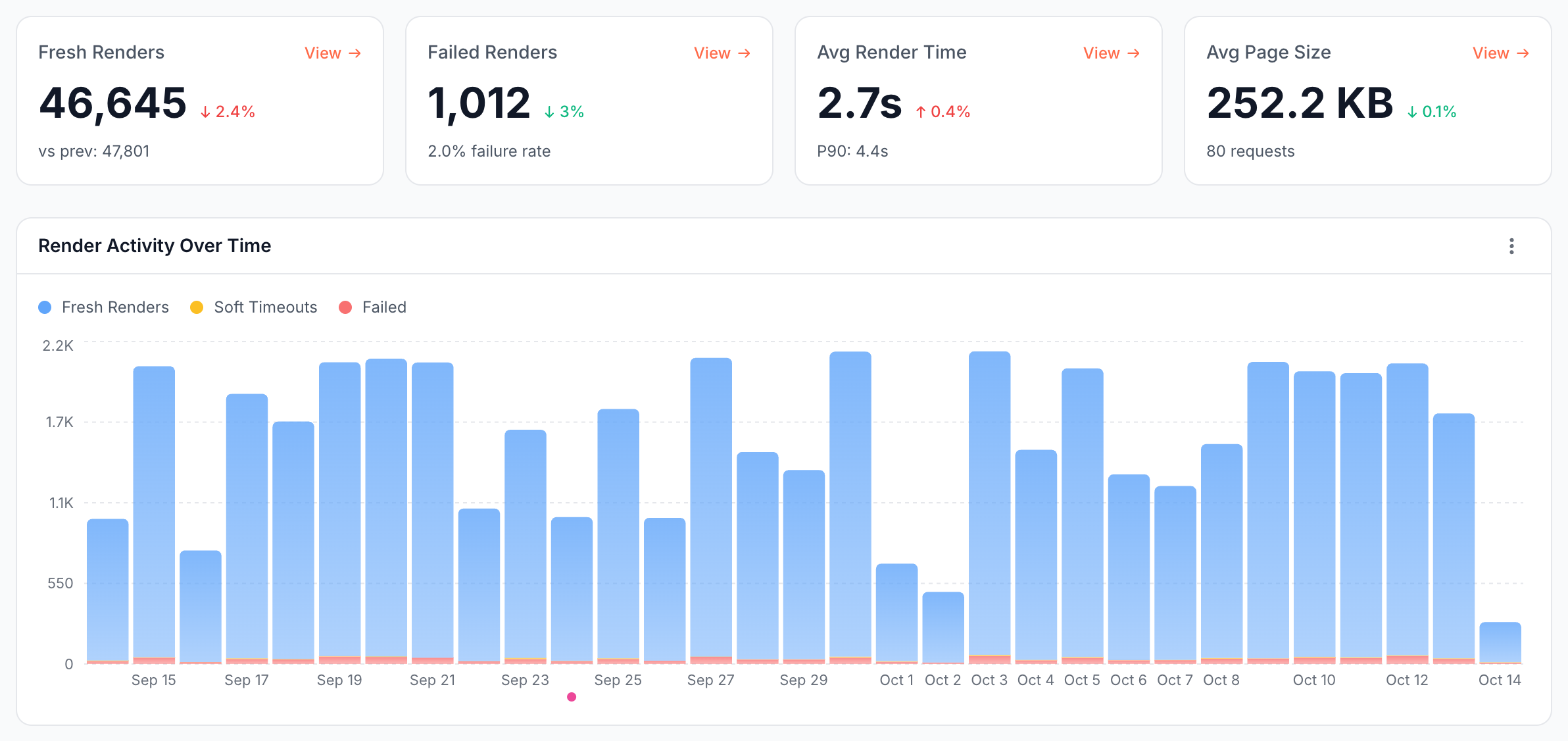
Cache > Renders reports every render with four tabs: Overview, Performance, JS Errors and Issues. They show render counts and failures, render time, page weight, JavaScript console errors, and which bots met which errors. See Monitor renders and JavaScript errors. To see the rendered HTML of one URL, open Page Analysis > Cache.
How this differs from server-side rendering and a prerender service
Server-side rendering and static generation build complete HTML in your own app, for visitors and bots alike, and are the native fix when you can rebuild. EdgeComet gives bots the same complete HTML without changing your app, which also works as a bridge during a migration. See Rendering options compared.
For Google's view of serving bots a rendered page, see Is prerendering for bots cloaking?
A standalone prerender service also renders pages for bots. EdgeComet also:
- Records every render and every bot request, with render time, JavaScript errors and the failures each bot met.
- Pre-caches from your Search Console data, sitemaps, Merchant Center feed and real bot visits, so bots rarely wait for a render.
- Applies per-URL render, cache and status settings and Edge SEO changes in the same request path.
- Serves server-rendered websites from the cache without rendering, in Cache-only mode.
See EdgeComet compared with a standalone prerender service.
What rendering does not do
- It does not change what visitors see. Only bot requests are rendered. Visitors get your app as before.
- It renders once per device profile, not per bot. Every bot matched to a dimension gets the same rendered copy.
- It does not store pages over 20 MB of HTML. A larger page fails as Response Too Large.
Where to find it
In the dashboard: Configuration > System Settings, tabs Rendering, Dimensions and URL Rules, for how pages render, and Cache > Renders for what the renders did.