

Pre-cache pages before bots request them
Pre-cache rules render or fetch your pages on a schedule and store them, so Googlebot and AI bots find a fresh copy in the cache instead of waiting for a render or for your server. Also called cache warming.
Smart Re-cache is the main rule: it refreshes each page bots request as often as that page changes, plus your homepage and top pages on every run. The other rules add data you already have: your top Search Console pages, your XML sitemaps and your Merchant Center feed. See How EdgeComet keeps cached pages fresh.
Which rule to use
Each rule answers a different freshness problem, and you can turn on any combination of them:
| Rule | Use it to | Default interval |
|---|---|---|
| Smart Re-cache | Refresh each page bots request as often as it changes, and your homepage and top pages on every run | Every hour |
| GSC Re-cache | Keep the pages that earn clicks or impressions cached | 12 hours |
| Sitemap Re-cache | Cache new pages as soon as they appear in your sitemaps, and keep every sitemap URL fresh | 12 hours |
| Merchant Feed Re-cache | Refresh product pages within the hour when price, stock or title changes | 1 hour |
Start with Smart Re-cache. Add the other rules for the pages it cannot know about: new sitemap URLs no bot has requested yet, and product changes your feed reports first.
A pre-cache rule is stored per website and takes effect when you click Save, with no deploy. EdgeComet starts a rule within 5 minutes of when it is due. It keeps each rule's run history for 90 days, and Smart Re-cache's for 14 days.
Save, check and run a rule
Every rule tab has the same bar at the bottom of the page. The line on the left says what the rule does now, for example "On · next run in 6 hours · would send 1,000 URLs now", and the buttons act on it:
- Show URLs: lists the URLs the rule would send now, with their counts.
- Recache now: runs the saved rule at once, after a confirmation such as "Recache now sends 1,000 URLs."
- Save: stores your changes.
With unsaved changes, the line starts with "Unsaved changes" and shows the saved count beside the new one, such as "was 500" or "was off". The run button then reads Save and recache.

Before you start
- Smart Re-cache needs bot traffic: it re-checks the pages verified bots requested. See Before you start on its page.
- GSC Re-cache needs Search Console connected.
- Sitemap Re-cache needs the URLs of your XML sitemaps, on the website's own domain.
- Merchant Feed Re-cache needs the URL of your product feed, an RSS 2.0 or Atom XML feed, plain or gzipped, and at least one domain on the website.
Keep your top Search Console pages cached
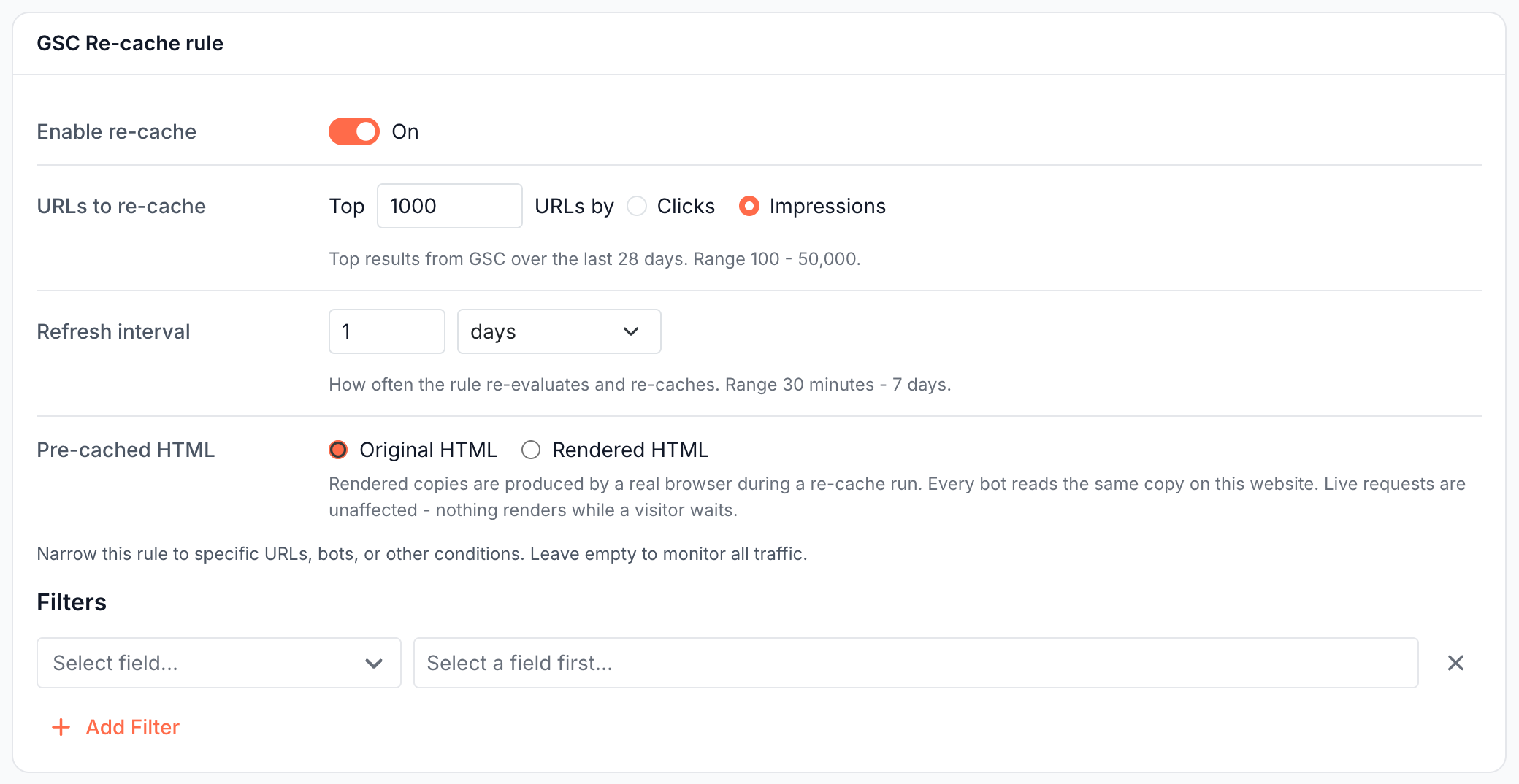
GSC Re-cache picks your top pages from Search Console over the last 28 days and refreshes them on every run.
- Open Configuration > Caching > GSC Re-cache and turn on Enable re-cache.
- Under URLs to re-cache, enter how many pages to keep, from 100 to 50,000, and rank them by Clicks or Impressions.
- Set Refresh interval, from 30 minutes to 7 days. For pages that earn traffic, an interval from 1 hour to 12 hours keeps them fresh.
- Choose Pre-cached HTML. To limit the rule to part of the site, add Filters on URL, clicks, impressions, position or CTR.
- Click Show URLs in the bottom bar to check the selection, then Save. Save and recache saves the rule and runs it at once.
The Setup page offers the same rule in one click: Turn on keeps your top 10,000 Search Console pages by impressions cached and refreshed every day.
Pre-cache new and changed sitemap URLs
Sitemap Re-cache fetches your XML sitemaps on every run and feeds two lanes: new URLs and a refresh of every URL.
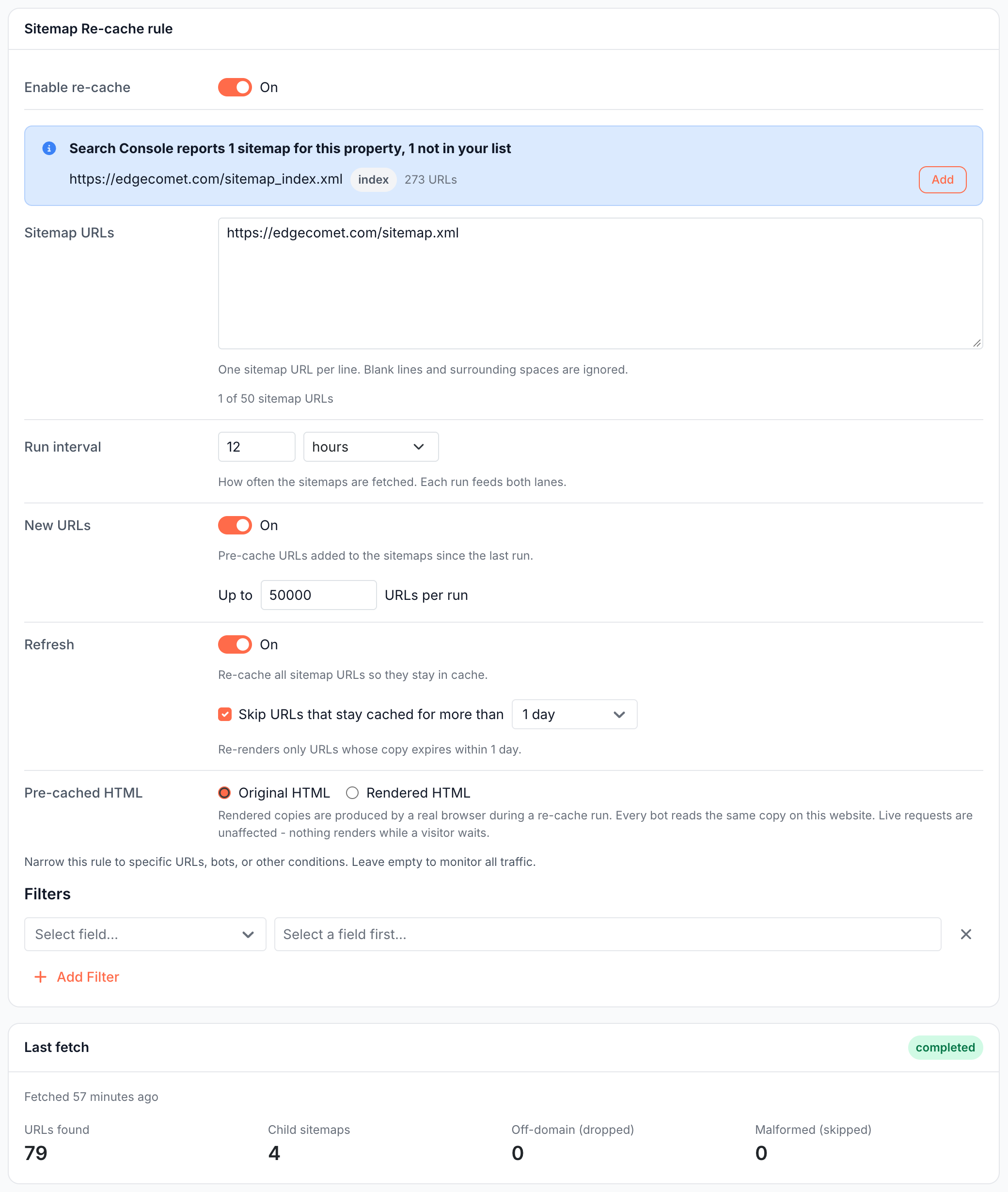
- Open Configuration > Caching > Sitemap Re-cache and turn on Enable re-cache.
- Add your sitemaps under Sitemap URLs, one per line, up to 50. EdgeComet reads the sitemaps you list here. Sitemaps that Search Console knows appear in a notice above the field with Add and Add all.
- Set Run interval, from 30 minutes to 7 days.
- Keep the lanes you need. Both are on for a new rule:
- New URLs: "Pre-cache URLs added to the sitemaps since the last run." Each run sends up to 50,000 new URLs by default, freshest
lastmodfirst. - Refresh: "Re-cache all sitemap URLs so they stay in cache." EdgeComet works through every sitemap URL, up to 100,000 per run. With Skip URLs that stay cached for more than set to 1 day, the default, it refreshes only the copies that expire within a day.
- New URLs: "Pre-cache URLs added to the sitemaps since the last run." Each run sends up to 50,000 new URLs by default, freshest
- Choose Pre-cached HTML, add Filters on URL,
lastmod, priority orchangefreqif needed, and click Save.
Each sitemap URL must be absolute and on one of the website's domains exactly as configured, so www.example.com and example.com count as different domains. EdgeComet follows sitemap indexes three levels deep, reads up to 1,000 child sitemaps and up to 1,000,000 URLs, and fetches them with the user agent EdgeCometSitemapFetcher/1.0. If your server or firewall blocks unknown clients, allow that user agent.
When you save a changed sitemap list, EdgeComet downloads your sitemaps first and sends nothing to the cache in that step. The bottom bar reads "Saved · downloading your sitemaps", and the run history shows the run with the trigger download. The Last fetch card shows URLs found, Child sitemaps, Off-domain (dropped) and Malformed (skipped).
Re-cache products when your Merchant Center feed changes
Merchant Feed Re-cache reads your product feed every hour by default and refreshes each product page whose details changed, so bots see the current price and stock without waiting for the cache to expire.
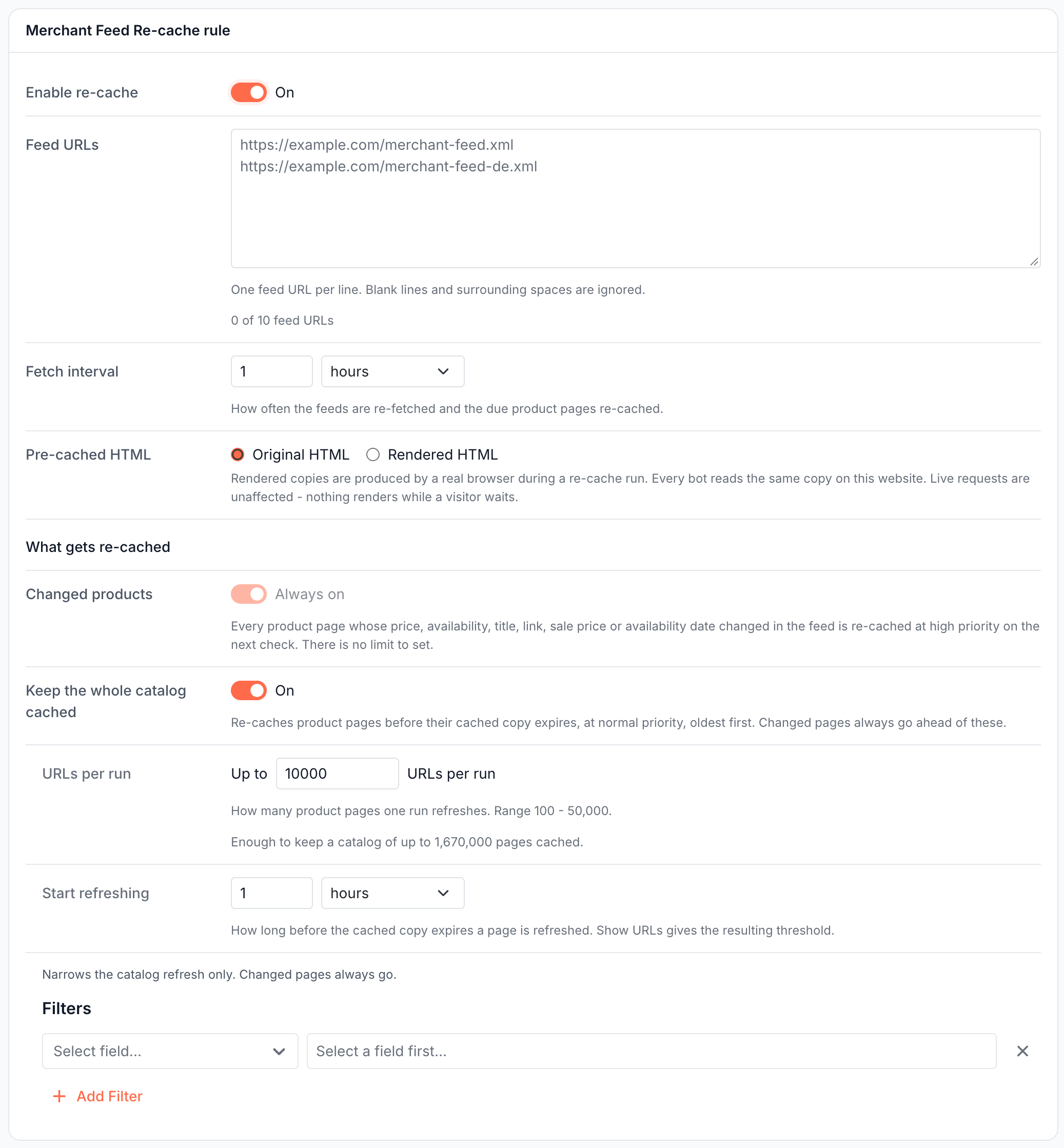
- Open Configuration > Caching > Merchant Feed Re-cache, turn on Enable re-cache and add up to 10 Feed URLs.
- Set Fetch interval, from 5 minutes to 24 hours.
- Review What gets re-cached:
- Changed products is always on: "Every product page whose price, availability, title, link, sale price or availability date changed in the feed is re-cached at high priority on the next check. There is no limit to set."
- Keep the whole catalog cached is on by default. It refreshes the other product pages before their copy expires, up to URLs per run (10,000 by default, from 100 to 50,000), starting the Start refreshing lead time before expiry (1 hour by default). Its Filters narrow this lane only. Changed products always go first.
- Click Save. A changed feed list is downloaded when you save, and Recache now runs the saved rule.
What each fetch changed, the feed checks that fail and Google's re-fetches show on E-commerce > Product Feed.
Refresh the pages bots request when they change
Smart Re-cache re-checks each page bots request as often as that page changes, and refreshes your homepage and top pages on every run. It replaced Smart Pre-cache in October 2026. Its setup, settings and run history are on its own page: Smart Re-cache: refresh cached pages when they change.
Store rendered or original HTML
Every rule has a Pre-cached HTML choice:
- Original HTML stores each copy the way the website normally serves it: rendered for render dimensions, your server's HTML for bypass.
- Rendered HTML renders every copy in headless Chrome, even for dimensions that normally bypass rendering. "Rendered copies are produced by a real browser during a re-cache run. Every bot reads the same copy on this website. Live requests are unaffected - nothing renders while a visitor waits."
- Choose per copy appears on websites with more than one dimension. Each dimension gets Original HTML, Rendered HTML or Off, which leaves that dimension out of the rule.
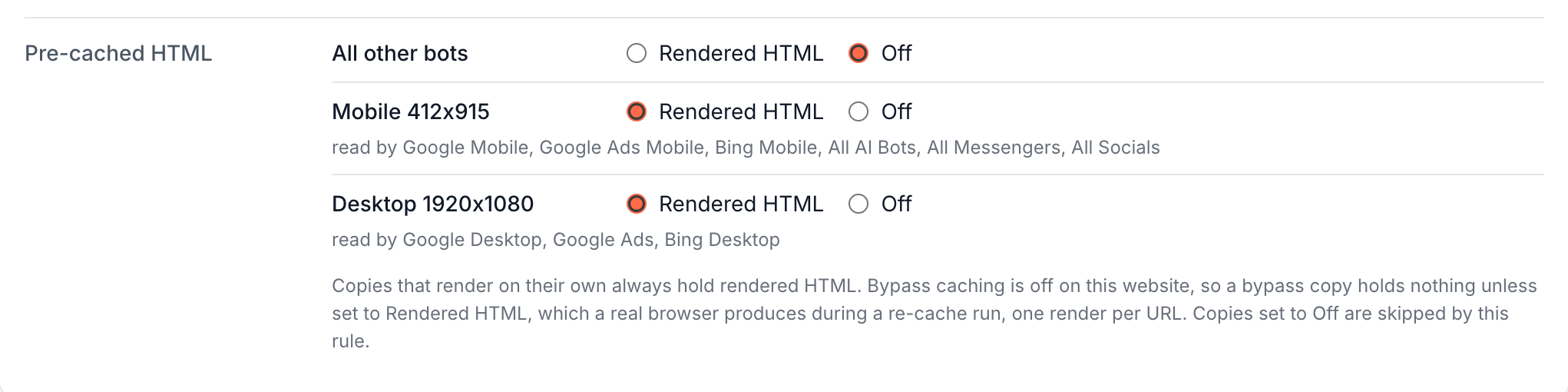
Rendered HTML lets a Cache-only website serve rendered pages for the URLs a rule covers, while every other URL keeps your server's HTML.
How pre-cache requests are prioritized
EdgeComet keeps a high and a normal queue for each website and always works through high-priority pages first:
| Priority | Sources |
|---|---|
| High | Smart Re-cache priority pages, changed products from the Merchant Center feed, URLs you submit on Cache > Precache > Queue (High is preselected), and pages changed by an Edge SEO publish, up to 5,000 per publish |
| Normal | Smart Re-cache due pages, GSC Re-cache, both Sitemap Re-cache lanes, the feed catalog lane, recache on Cached URLs, and API requests by default |
How many pages refresh at once is set by Concurrent re-caches. A page that is already fresh keeps serving while its refresh waits in the queue. To pause or empty the queue, see Pause or clear the pre-cache queue.
What you should see
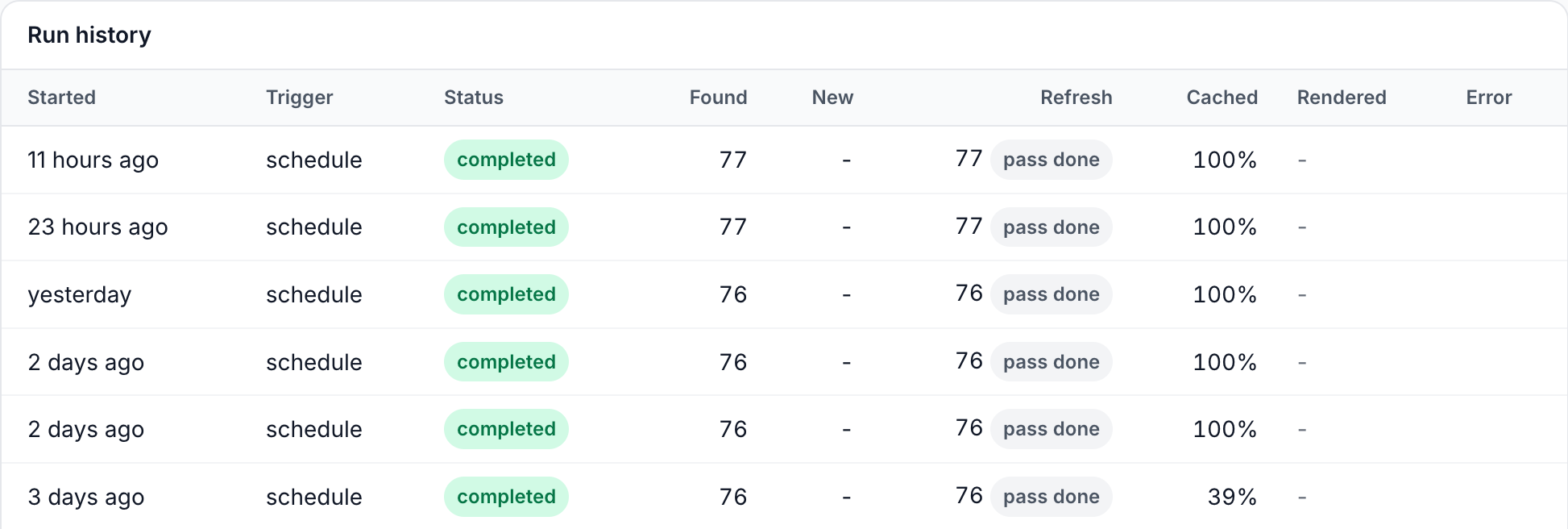
- Each rule's Run history gains a row per run with its status, such as completed, and its counts. GSC Re-cache shows Selected and Queued, Sitemap Re-cache shows Found, New and Refresh, and Smart Re-cache shows Priority, Due, Sent and Held back.
- Cache > Precache > Statistic lists every rule in the Pre-cache rules card with "Ran ... - N sent" and the next run. See Is pre-cache working?
- The pages appear on Cache > Precache > Cached URLs, and bots get them with
EC-Source: render_cacheorbypass_cache.
If it does not work
"Connect Search Console first."
GSC Re-cache and the Setup page quick start need Search Console. Connect it, then turn the rule on.
The Last fetch card shows off-domain or malformed URLs
Off-domain (dropped) counts sitemap entries on a domain the website does not have, including www against a bare domain. Malformed (skipped) counts entries that are not valid URLs. Fix the sitemap, or add the missing domain to the website.
"Every copy this rule can pre-cache is set to Off."
Under Choose per copy, set at least one dimension back to Original HTML or Rendered HTML, or turn the rule off.
A rendered copy fails for some URLs
Rendered HTML works for pages that bypass because of their dimension. A page that a URL rule sets to bypass is reported as failed. Change the URL rule to Render, or exclude those URLs from the rule with a filter.
A run failed
The Error column of the rule's Run history gives the reason. A failed Sitemap Re-cache run is retried after its run interval or 30 minutes, whichever is shorter.