

Keyword opportunity research skill
EdgeComet's Keyword opportunity research skill finds the keywords that could bring your site more search traffic. For each keyword cluster, it tells you whether to improve a page you have or create a new one. Also called a competitor keyword gap analysis or a keyword opportunity finder.
It starts from the queries your pages already get in Search Console, expands and qualifies them with live keyword data, and compares your rankings with your competitors'.
Each keyword cluster ends in one of two places. Clusters your pages already cover become a finding you can track on the Action Board. Clusters with no page go into a coverage plan.
What you get
One run gives you four things:
- A finding for pages you already have. Pages that rank for a keyword cluster but underperform become a proposed finding, which carries the qualified keyword table as external research.
- A coverage plan for topics you have no page for. A research document with one section per uncovered cluster: the target keywords with volume and difficulty, the intent, what competitors rank with, and the page to create.
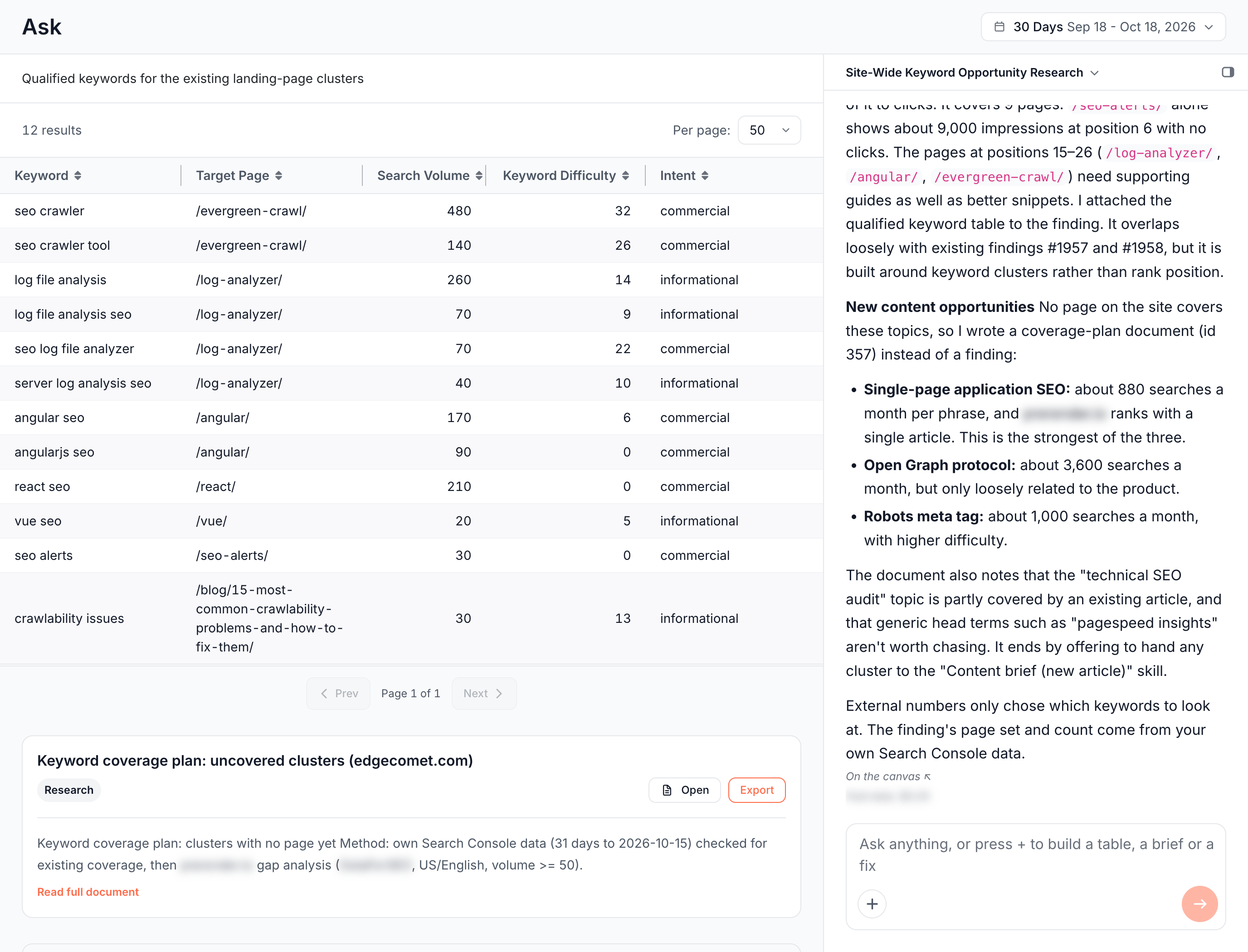
- A qualified keyword table on the canvas, with each keyword, the page of yours that targets it, search volume, keyword difficulty and intent.
- A summary in the chat of what the run examined, the opportunities it found and the terms it chose not to chase.
On edgecomet.com, a run on the whole site mapped 1,317 Search Console queries to the pages that rank for them and qualified 27 related keywords. It proposed one finding, "Product landing pages hold the site's search demand but convert almost none of it to clicks". Its coverage plan held four clusters, among them single page application SEO and the robots meta tag.
How keyword opportunity research works
The skill follows the same six steps on every run:
- It seeds from your own data. It pulls the top queries by impressions from Search Console, with the pages that rank for them, before any live keyword lookup.
- It expands the seeds. It grows the strongest topics and queries into related keywords you do not rank for yet.
- It qualifies the candidates. It looks up search volume, keyword difficulty, cost per click and intent for each one, then keeps the keywords your site can rank for that match the intent of your pages.
- It finds the gap. It compares your rankings with one or two competitors. It takes the ones you name first, then the ones in Guidelines, and with neither, it finds the competitors for your keywords.
- It checks your own coverage. For each cluster, it looks in Search Console and the bot log for a page of yours that already targets it, even weakly.
- It routes each cluster. Clusters your pages already cover, but underperform on, become a finding. Clusters with no page go into the coverage plan.
Live keyword data decides which keywords the run looks at. It never sets a finding's pages, counts or priority: those come from your own Search Console and bot data, and EdgeComet recounts them like every other finding. See How Ask works.
Run a keyword gap analysis
Run the skill from a new Ask conversation:
- Click the Ask tab at the top of the sidebar, then New conversation.
- Press +, choose Run a skill, then Keyword opportunity research. You can also click Run next to the skill under Action Board > Skills.
- Under Run against, choose Whole site, a Segment such as your blog, or a URL list.
- Optional: fill in the two inputs. Each answer takes up to 900 characters.
- Seed topics: "Topic areas to expand from, one per line. Leave empty to seed from your top GSC queries."
- Competitors: "Domains to compare against, one per line. Leave empty to use your Guidelines competitors, or let the run find them."
- Click Start.
The run opens as a conversation and shows each step as it works, such as reading Search Console queries or qualifying keywords.
List your competitors once under Guidelines, and every keyword gap run uses them. See Run a skill for the scope options all skills share.
Read the result
The conversation holds the whole result:
- The chat explains what the run examined, which pages hold your search demand, which keywords it qualified, and what it skipped and why.
- The keyword table on the canvas is a snapshot table: its figures are fixed at the time of the run.
- The proposed finding shows as a card with Add to board. Until you click it, the finding stays in the conversation.
- The coverage plan shows as a document card with Open, Export and Read full document. It is also listed under Action Board > Outputs > Documents.
The coverage plan opens with the method the run used, then has one section per cluster:
- Target keywords, each with its monthly volume and difficulty.
- Intent, and how close the topic is to your product.
- Competitor evidence: how strongly the ranking pages hold the topic.
- Page to create: a working title, what the page should cover, and the pages it should link to and from.
It ends with the terms not worth chasing, such as off-topic head terms with high competition, and a line on handing a cluster to the Content brief skill.
Each run writes a new coverage plan, and asking for a change in the same conversation edits it in place. See Where the results land.
Act on the result
- Track the finding. Click Add to board. The finding joins the Action Board with its pages counted from your data, and the keyword table stays on it under External research. See Findings from Ask and skills.
- Brief a new page. Run the Content brief skill and type a cluster name, or the coverage plan's title, in Topics to brief.
- Improve a page that ranks. Run Article optimization on the page that holds the cluster.
- Share the plan. Export the coverage plan to Google Docs or download it as Markdown. See Export documents.
- Dig into one keyword. Ask a follow-up in the same conversation, such as a request for the live results of one query. See Keyword research in Ask.
How this skill differs from a keyword research tool
- A keyword research tool lists the keywords a domain ranks for and the ones it misses. You still map them to your pages and check what you already cover. This skill starts from the queries your pages already earn in Search Console and checks your own coverage before it suggests a new page.
- A keyword gap export stays a spreadsheet. With this skill, each gap becomes a finding that EdgeComet recounts from your data, or a coverage plan that the Content brief skill turns into briefs.
Where to find it
In the dashboard: Ask > New conversation > + > Run a skill > Keyword opportunity research, or Action Board > Skills. Coverage plans are under Action Board > Outputs > Documents.