

Check structured data and rich result eligibility
The Evergreen Crawl Structured Data report shows which Google rich results the JSON-LD on your pages can earn, which pages lack the markup their page type needs, and what your homepage declares about the site. It reads the JSON-LD on the pages bots received.
The report has two tabs: Overview, described on this page, and Validation, which checks the markup against schema.org and Google's rich result requirements. See Validate structured data across your site.
The report reads the markup as EdgeComet served it. JSON-LD that an Edge SEO rule inserts counts like markup in your HTML source, and on pages EdgeComet renders, JSON-LD that JavaScript adds counts too.
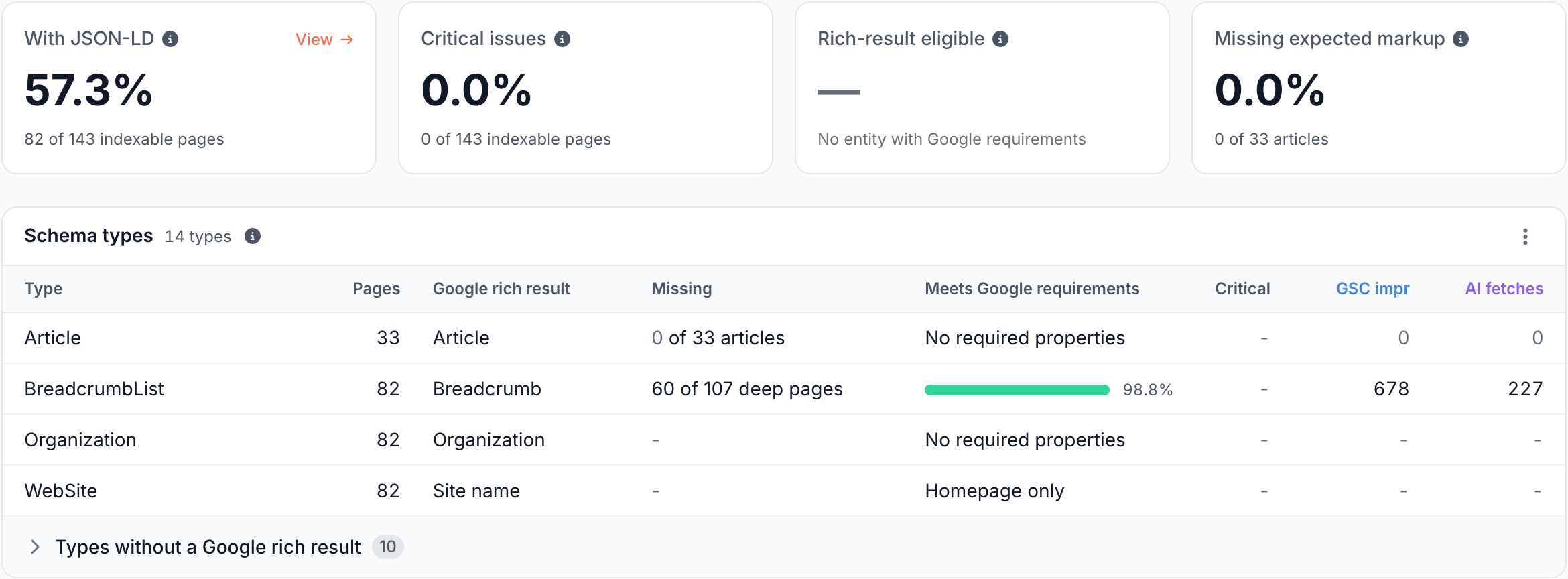
What the Overview tab shows
The Overview tab answers how much of the site carries JSON-LD and which rich results it can earn.
Cards: how much markup, and how much of it works?
Each card is a share, and its footer names the pages it counts, such as "82 of 143 indexable pages" or "0 of 33 articles":
- With JSON-LD: pages with at least one JSON-LD block that declares a
@type. - Critical issues: pages with at least one Critical finding.
- Rich-result eligible: of the pages judged as a Product, Event, JobPosting, Recipe, VideoObject or LocalBusiness, the share with every Google-required property. Breadcrumb trails are judged in the Schema types table.
- Missing expected markup: product pages without a JSON-LD Product and articles without an Article, including pages where it is only nested inside another node.
Schema types: which rich results can each type earn?
Schema types has one row per Google rich result, with a subtype under the type Google judges it as, such as BlogPosting under Article:
- Type and Pages: the type and the validated pages that carry it.
- Google rich result: the result the type feeds, such as Product snippet, Breadcrumb, Event, Recipe or Site name.
- Missing: pages that should carry the type and do not, such as "60 of 107 deep pages" for BreadcrumbList.
- Meets Google requirements: the share of pages with every property Google requires for the rich result.
- Critical: pages with a Critical finding on this type. Click the number to open them on the Validation tab.
- GSC impr and AI fetches: the demand on the pages losing the rich result, because the type is missing or fails Google's requirements.
Product pages and articles are recognized by your custom extractions: a product name with a price, availability or SKU, or a headline with a publish date. Until those rules exist, the Missing expected markup card reads "Needs product or article extraction rules", and Missing shows Set up extraction rules or Needs extraction rules. Deep pages are recognized from the URL path and need no setup.
Types with no Google rich result, such as WebPage, fold into one closed row at the bottom.
Site identity: what does the homepage declare?
Site identity reads the top-level Organization and WebSite JSON-LD on your homepage, where Google looks for the site name and logo.

The Organization row shows its name, URL, whether it has a Logo and how many Profiles (sameAs links) it lists. The WebSite row shows its name, URL and alternateName.
When the homepage has no such node, its row reads "No JSON-LD Organization on the homepage" or "No JSON-LD WebSite name and URL on the homepage". The Site name line checks whether WebSite.name appears in the homepage title, marked In the title or Not in the title.
Issues in this category
The last card lists the Structured Data & Images checks that found pages, such as No JSON-LD BreadcrumbList on a deep indexable page, JSON-LD page entity missing a Google-required property or Any image without alt text.
What the Validation tab shows
The Validation tab lists every problem in the JSON-LD bots received, from syntax errors to missing recommended properties, each rated Critical, Warning or Opportunity with the pages and demand behind it. See Validate structured data across your site for the severities, every problem the validator reports and how to fix it.
How to read it
- Critical findings cost rich results. Fix them first, starting with the types that carry the most demand. The Critical, Warning and Opportunity levels are defined on the validation page.
- Missing markup counts as much as broken markup. A product page with no Product loses the product snippet as surely as one with a syntax error. Read Missing next to Critical.
- Values wait for validation. The cards and the Schema types table read the crawl's validation results. Until those are ready, the cards show "waiting for this crawl's issue evaluation", and when too few of the pages with JSON-LD were validated, "Not enough validated pages in this crawl". See When the tab shows no findings.
What to do next
- Fix it at the edge. Structured data at the edge adds a block filled from each page's own values, or replaces a broken one, without a release.
- Start from the Action Board. Missing and broken markup becomes Action Board findings, each with a fix you can start: an Edge SEO rule or a brief for your developers.
- Ask about it. Ask in the header starts with "How many pages have critical schema issues?", "Which product pages have no JSON-LD Product?", "What is broken in our JSON-LD?" and "Does our homepage declare the site name and organization?".
Where to find it
In the dashboard: Evergreen Crawl > Structured Data, with the tabs Overview and Validation.