

Edge SEO overview
EdgeComet Edge SEO changes the pages that search engines and AI bots receive, as EdgeComet serves them. Also called SEO at the edge.
You can change titles, meta descriptions, robots directives, canonicals, hreflang, Open Graph tags, structured data, any element a CSS selector can reach, and the response itself as a 301, 302, 404 or 410.
Your site's code and CMS stay as they are. A fix ships in minutes instead of waiting for a release.
What edge SEO is
Edge SEO means making SEO changes in the layer between your server and the crawler, instead of in your CMS or code. EdgeComet already sits in that layer for bots: it renders or fetches every page it serves them. Edge SEO rewrites that page on its way out.
On a website that EdgeComet renders, rules run on the page after its JavaScript ran. That is the title, canonical and content a bot actually reads. Edge SEO works on React, Vue and Angular apps where tools that only see the raw HTML cannot read the real title.
How Edge SEO works
An Edge SEO rule names the pages it applies to and what to change on them. When EdgeComet renders or fetches a matching page, it applies the rules, then caches the result.
- Applied before caching. A cache hit serves the page with the changes already in it, and no rule runs on it.
- On every HTML page EdgeComet serves, rendered or passed through from your server. Other files are untouched.
- In deploy order. Live rules run in the order they went live, and a rule you deploy now runs last. Content changes add up: a later rule sees an earlier rule's edits. A redirect, 404 or 410 rule ends the cascade and replaces the response.
- Safe on errors. If a page cannot be parsed, bots get it unchanged.
- Live at once. When you deploy, EdgeComet recaches the affected pages, and bots get the new version without waiting for the cache to expire.
To see every rule that touches one page, paste its URL into Search or paste a URL on the Edge SEO page. It lists the live changes in the order they run, then the drafts and rolled-back changes for that page.
Bots receive the changes through your CDN routing. Human visitors see them only if you install the Edge SEO snippet.
What you can change
| Change | Examples | Page |
|---|---|---|
| Search result tags | Title, meta description, robots noindex | Rewrite titles, meta descriptions and robots tags |
| Link tags | Canonical, hreflang, preconnect and other head links | Set canonical, hreflang and other link tags |
| Social and other meta tags | og:title, og:image, Twitter tags, any meta tag by name | Rewrite titles, meta descriptions and robots tags |
| Page content | Rewrite an H1, fix alt text, remove or move a block, turn an H3 into an H2, insert HTML | Change page content on the page |
| Structured data | Add Product, Article or BreadcrumbList JSON-LD, fix or remove a block | Add and edit structured data (JSON-LD) |
| The response | 301 or 302 redirects, 404, 410 | Serve 301 redirects and 404 or 410 |
A rule can cover one URL or thousands of pages matched by filters, with values built from the page and its URL. See Apply one rule to thousands of pages.
Where rules come from
You can write rules yourself, or let EdgeComet draft them:
- The rule editor: New rule on the Edge SEO page, or Create rule for this URL on Page Analysis > Edge SEO. Describe the change in plain language, or set it up yourself. See Create an Edge SEO rule.
- The Action Board: a finding about titles, canonicals, robots tags, redirects or missing structured data can become a set of draft rules, reviewed and deployed from its task.
- Ask: the Edge SEO fix option, the Ask panel on any report and the panel beside the rule editor draft rules from a request in plain language, such as "rewrite the meta descriptions of pages losing clicks", and change drafts that exist.
- AI clients over MCP: Claude, ChatGPT and other clients connected to the EdgeComet MCP server can preview changes, save drafts and change them.
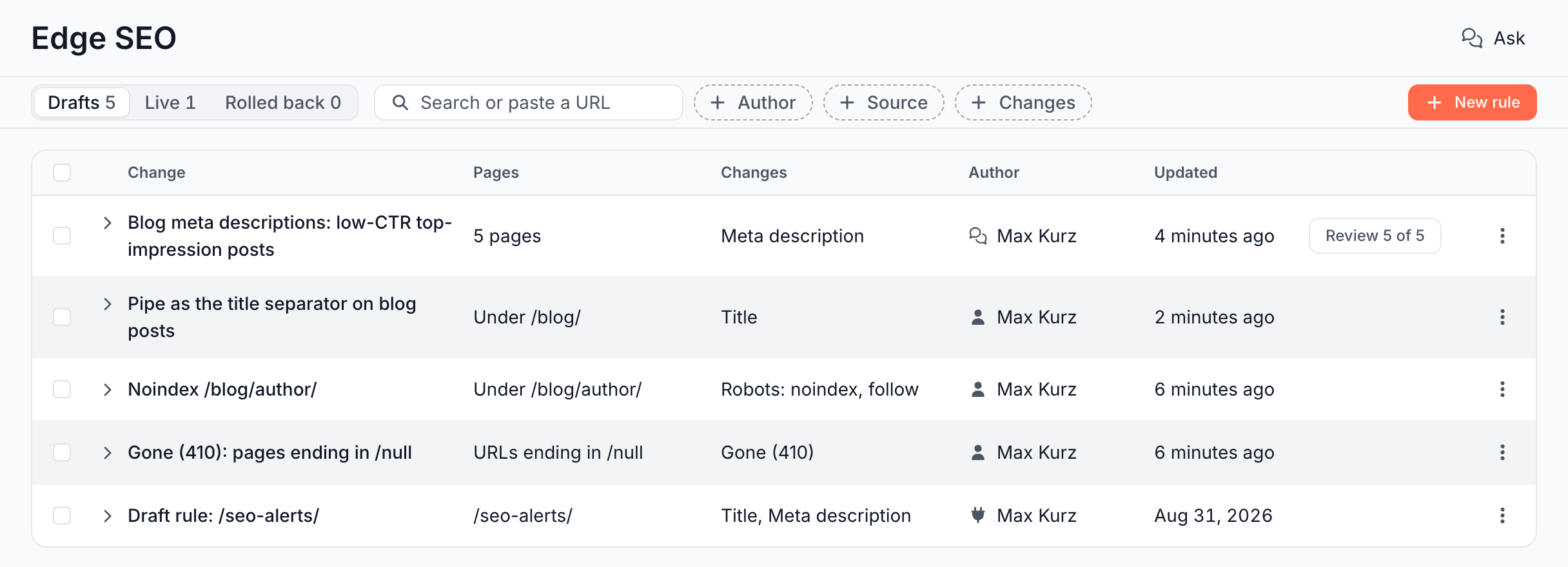
Every path ends in a draft that carries the reason for the change, and a person deploys it. The Author column shows who made each change, with an icon for where it came from, and the Source filter narrows the list to Editor, Ask, Claude (MCP) or Action Board.
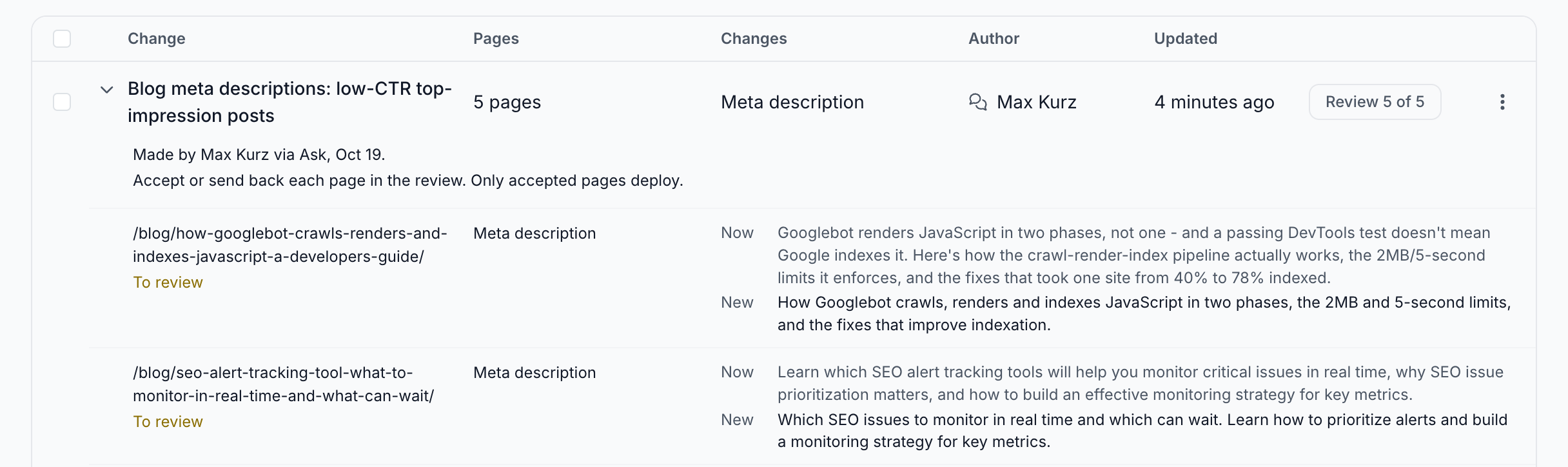
AI drafts that give each page its own value arrive as a batch you review page by page. Only the pages you accept deploy.
Preview, publish and roll back
Before a rule goes live, the editor shows the current and the new value on each page it matches, and checks the page you select with the real rendering engine.
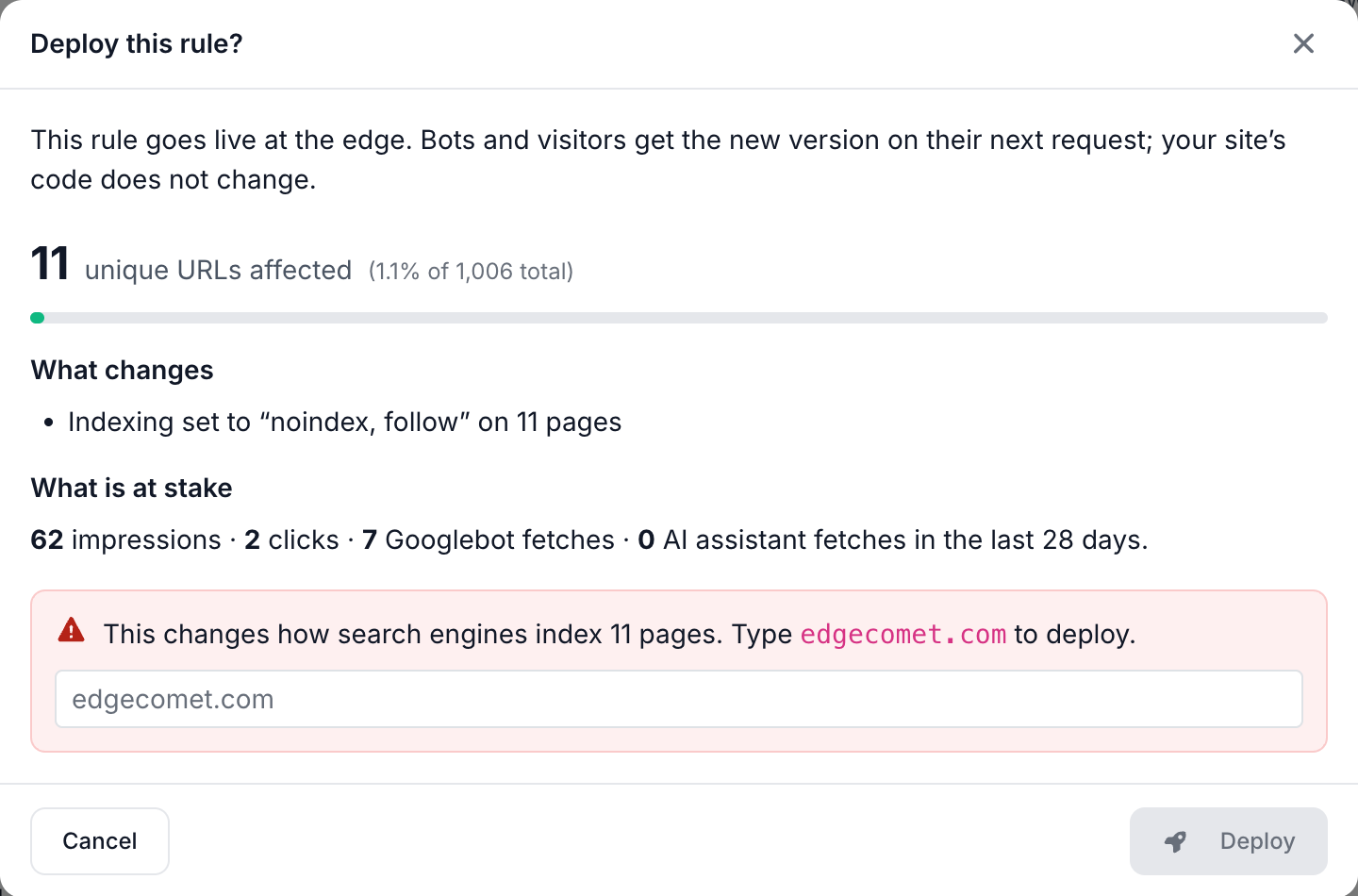
Deploying shows what changes, how many pages the rule affects out of those bots requested in the last 30 days, and the traffic on them. It asks you to type your domain for an indexing, canonical or response change, and when a change reaches 100 pages or more.
Each rule keeps a history, and Roll back takes it out of production. See Preview, test and publish Edge SEO rules.
Once a change has been live for 28 days and Search Console has reported those days, its row on the Live tab compares their clicks and impressions with the 28 days before the deploy. Indexing, canonical and response changes show no comparison: a noindex, a canonical or a 410 is meant to move clicks away from the page.
Test a change on part of your pages
Edge SEO runs SEO split tests, also called SEO A/B tests. One rule changes a test group of pages, and a control group of similar pages stays as it is. An AI agent, Ask or a client connected over MCP, picks and splits the pages, drafts the rule and reads the result from EdgeComet's data.
Every bot and every visitor gets the same version of a given page: the test splits pages, not visitors. See Run SEO split tests with Edge SEO and an AI agent.
Edge SEO compared with CMS changes and JavaScript snippets
- A CMS or code change fixes the source, which stays the right long-term home for content. It also needs a developer, a release and a CMS that exposes the field. Edge SEO ships the fix today and can cover pages your CMS cannot reach, such as faceted or legacy URLs. When the source is fixed, roll the rule back.
- A JavaScript SEO tool changes the page in the browser after it loads. Bots that do not run JavaScript, which includes the AI fetchers EdgeComet has tested, never see the change, and Googlebot sees it only after its rendering pass. See Do GPTBot, ClaudeBot and other AI bots run JavaScript? Edge SEO changes the HTML bots receive, and every bot reads it on the first request.
- A CDN worker you write yourself can rewrite HTML too, as code you maintain. Edge SEO gives you the same reach with an editor that works on the page itself, previews on real pages, history, roll back, and the bot and search data to see where a fix is needed and what it changed.
Edge SEO rules and URL rules overlap only on status codes. See URL rule or Edge SEO rule: which one to use.
For how search engines judge changes made for bots, see Is Edge SEO cloaking? and Is prerendering for bots cloaking?
What Edge SEO does not do
- It does not publish AI drafts on its own. Drafts from the Action Board, Ask and MCP wait for a person to deploy them.
- It does not change your server, code or CMS. Roll back a rule and bots get your original page again.
Where to find it
In the dashboard: Edge SEO in the sidebar, with the tabs Drafts, Live and Rolled back. For one URL, Page Analysis > Edge SEO lists the Rules affecting this URL. The visitor snippet is under Configuration > Connections.